The 7 Best Projectors With Airplay For 2025
 By, Michael Brown
Updated
Summary
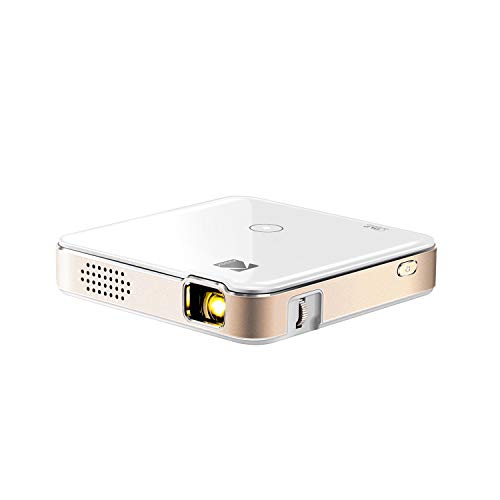
KODAK Luma 150 Projector

Epson Pro EX9270 Projector

BenQ TK710STi 4K Projector
For anyone who wants a truly seamless streaming experience, a projector with AirPlay can transform the way you watch movies, give presentations, or share content from your Apple devices. AirPlay lets you mirror your iPhone, iPad, or Mac screen directly to the projector wirelessly, eliminating messy cables and complicated setups.
When selecting the best AirPlay projector, focus on factors like brightness, resolution, and ease of connectivity. A projector with higher lumens ensures vibrant, clear images even in well-lit rooms, while HD or 4K resolution delivers sharp detail for movies, games, or presentations. Built-in speakers and smart features can also add convenience and versatility to your setup.
Among the leading options, the KODAK Luma 150 Projector shines with its bright, colorful images, compact design, and reliable AirPlay performance. Ahead, we will share our curated list of the best projectors with AirPlay, highlighting models that offer outstanding image quality, effortless connectivity, and versatile use for both entertainment and productivity.
Our Top Picks


Pocket sized Works with AirPlay wireless mirroring Bright widescreen 16:9 projection Simple wired and wireless options
Doesn't have vertical keystone adjustment
Carrying the KODAK Luma 150 around feels a bit like having a small entertainment centre in your pocket. Despite its compact frame, the projector can expand your movies, photos, or presentations to a generous 150 inches. Its 60 ANSI lumen LED lamp and 854 x 480 resolution deliver a clear, colorful widescreen image, and it even supports 4K content playback when connected to external devices. With HDMI and micro USB included, you can hook it up to cameras, laptops, and drives, or simply go wireless through AirPlay or Miracast for quick mobile mirroring.
The built-in speaker and illuminated controls make it easy to use anywhere, and the 2.5 hour rechargeable battery life is enough for casual viewing or a short presentation. It fits nicely into everyday routines, from sharing vacation photos in the living room to playing videos during a work meeting.
While the Luma 150 does not offer vertical keystone or angle correction, you can still get a clean picture with a bit of manual setup, especially since the device is so lightweight and easy to position. Overall, it’s a handy multimedia companion for anyone who values portability and simple AirPlay connectivity.

Bright in well-lit spaces Large 300-inch image size AirPlay and Miracast support Easy setup with auto correction
Fan noise increases in bright mode
What impresses first about the Epson Pro EX9270 is how effortlessly it fills a room. With an image size of up to 300 inches and Full HD 1080p resolution, it transforms everyday displays into something far more impressive. The 4,100 lumens of both color and white brightness keep the picture vibrant even in bright rooms, making it ideal for group presentations or classrooms. Its 3-Chip 3LCD technology ensures every frame shows true, accurate color without the distracting rainbow effect that comes with some projection types.
AirPlay compatibility makes it simple to cast videos, presentations, or photos from an iPhone, iPad, or Mac, and Miracast covers Windows users as well. The dual HDMI ports, USB power output, and easy connectivity with streaming devices help it adapt to nearly any setup. Even the built-in 16 W speaker adds a surprising amount of depth to audio.
Thanks to features like 1.6x optical zoom, a horizontal slider, auto vertical correction, and a picture skew sensor, dialing in a clean image doesn’t take much effort. And although the fan becomes noticeable when using brighter modes, the projector still maintains its strong performance without disrupting the viewing experience too much.

Vivid laser-driven brightness Smooth low-latency gaming True 4K with rich color Built-in Android TV streaming
No lens shift adjustment
The TK710STi makes an immediate impression once it powers on. Its 3200 ANSI lumens laser light source keeps images bright and punchy in everyday living spaces, so there’s no need to darken the room just to enjoy a movie. The laser engine also delivers vivid saturation and eliminates frequent lamp replacements, which feels like a long-term convenience you quickly come to appreciate. Paired with 4K resolution and 95% Rec.709 color coverage, this projector creates a cinematic image that pulls you in with its detail and color accuracy.
Gamers get something special here too. With low latency and a fast 4ms response at 1080p 240Hz, it handles competitive console and PC gameplay without the usual motion delay. Everything feels responsive, which adds a new level of immersion during fast-paced games.
Android TV rounds out the experience, letting you stream Netflix, Prime Video, YouTube and more without any extra devices. It keeps the setup clean and user-friendly, especially for families sharing one entertainment system. While the projector doesn’t include lens shift, positioning it carefully still gives you a sharp, aligned image thanks to its short-throw design and consistent clarity. Once it’s placed, the viewing experience remains impressively solid.

Lightweight and highly portable AirPlay and Screen Share support Built-in streaming with webOS Flexible 30 to 120 inch image
Built-in speaker is not very powerful
The LG CineBeam PF510Q is a compact projector designed for people who want big-screen entertainment without the bulk. Its compact size makes it easy to pick up and place wherever you want, and it adapts well to tight rooms thanks to its flexible screen range from 30 to 120 inches. Once it’s on, webOS 22 puts Netflix, Prime Video, YouTube, Apple TV+ and more right at your fingertips, so finding something to watch becomes effortless.
Apple users will get the bonus of AirPlay 2 and HomeKit compatibility, which means casting from an iPhone, iPad, or Mac takes just a tap. Android users aren’t left out either, with Screen Share offering smooth wireless mirroring. This projector even lets you pair two Bluetooth audio devices at the same time, which is surprisingly fun when watching with someone else or when using dual speakers for more immersion.
Full HD resolution keeps movies and games sharp, and the auto vertical keystone handles alignment quickly. Its long-lasting 30,000 hour light source adds peace of mind, especially for frequent use. Although the built-in speaker is not very powerful, pairing external Bluetooth audio easily enhances the experience, ensuring you still get engaging sound without much effort.

Flexible 135-degree projection Rich 2.1 channel audio Reliable AirPlay casting support Vibrant Rec.709 color performance
The battery doesn’t last very long
The BenQ GV30 is one of those compact projectors that instantly changes the mood of a room. You place it down, tilt it just right, and suddenly the ceiling becomes your evening theater. Its adjustable 135-degree angle makes it fun to experiment with different viewing positions, and the autofocus and vertical keystone pick up the rest, keeping the picture straight without much tinkering.
Once the movie starts, the projector’s 720p HD resolution and 300 ANSI lumens produce a clean, cozy image that suits bedrooms and small spaces beautifully. The colors look warm and inviting thanks to BenQ’s CinematicColor and its wide 98% Rec.709 color gamut, making animated films, dramas, and even simple YouTube videos feel more alive. And the sound surprised me most: the built-in 2.1 channel speaker system with extra bass gives the projector a fullness you rarely get from something this size. It easily fills a small room without needing external speakers.
Android TV adds convenience, and with AirPlay support you can cast straight from your iPhone or iPad whenever you want to share photos or stream a show. One minor downside is that the battery doesn’t last very long. But it still allows for short sessions of wireless viewing, and plugging it in keeps the fun going without interruption.
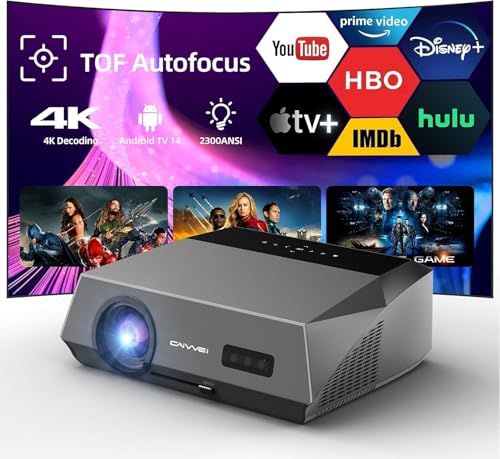
Fantastic 4K HDR picture Super bright 2300 ANSI lumens Fast ToF autofocus tuning Dolby Audio with two-way Bluetooth
Can warm up during long use
The first moment the Pxodyda lights up, you notice its sharpness. Its 4K UHD decoding with HDR10+ and a 6-color LED engine pulls out details that make movies feel richer and more lifelike. Even with sunlight in the room, the projector keeps its image vibrant thanks to its impressive 2300 ANSI lumens and AI brightening technology. It’s the kind of performance that makes afternoon sports or weekend movie marathons feel effortless.
For those who want wireless casting, the projector gives you plenty of freedom. AirPlay works smoothly for sharing from Apple devices, while NFC mirroring offers an instant tap-to-connect option from compatible phones. Combined with WiFi 6 and Android 14.0’s official apps, you can jump into content without relying on extra streaming sticks.
Sound gets its own spotlight, too. With Dolby Audio and two-way Bluetooth, the projector can connect to your speakers or act as one itself. While it may warm up after long continuous use, giving it short breaks or ensuring good ventilation keeps performance steady for extended sessions.

Google TV 14.0 with top apps AirPlay wireless casting supported Smooth motion with MEMC technology Bright and accurate FHD images
Manual 4-point correction is a bit clunky
This projector is designed to make streaming and viewing simple. Google TV 14.0 provides fast navigation, smooth startup, and access to countless apps, while AirPlay lets Apple users cast directly to the screen without any fuss. Movies, sports, and gaming look crisp thanks to the 1000 ANSI lumens brightness, HDR10 support, and full FHD resolution. Colors pop naturally, and the SGS-certified brightness gives confidence that what you see is accurate and reliable.
MEMC technology adds another layer of polish, smoothing out fast-moving action so that sports or action-packed scenes appear fluid and blur-free. For families, the built-in Kids Mode and PIN lock make screen time safer and more manageable. This projector also adapts to various setups, projecting large, immersive images indoors or in the backyard, making it versatile for almost any space.
However, the manual 4-point correction can feel a bit clunky at first. But once the image is aligned, it stays consistent, letting you focus on enjoying content. Overall, the D1 combines smart streaming, dependable brightness, and smooth motion for a satisfying viewing experience.
What to Look For in a best projectors with airplay?
You may know that best projectors with airplay is a kind of product many customers are hesitant to pay for. It is not due to its quality but the fact that there are many factors you must consider. Nevertheless, all your worry is not a problem for us. Our knowledgeable staff will help you with the right decision.
Tech-evaluated and high-rated products are available in our list of eligible items. Here are some indispensable things you shouldn’t ignore:
Portability
Resolution
The calculation for projectors that have 4K ultra high definition (3,840 x 2,160 pixels) is slightly different.
Projection Tech
DLP projectors with single-chip DLP chips could be subject to the so-called "rainbow effect." Sometimes, tiny, bright flashes with rainbow-like colors may appear, especially in dark scenes. Some DLP projectors have a minimal effect, while others can produce a distracting result, especially when there are bright areas against shady backgrounds. The rainbow effect is not a problem with LCD projectors, which are safer if someone in your household has sensitive eyes. There are many DLP projectors that produce excellent images.
Light Source
For longer periods of time, LEDs and lasers retain a greater percentage of their original brightness. While all light sources eventually lose their brightness, lamps lose the most in 500 hours. Then, they slowly decline over time. The brightness of LEDs and lasers will decrease more slowly over the course of their lifetimes.
Brightness
The ambient lighting level, size and material of your projector screen will all affect the brightness. You should buy a professional seller if you are installing a projector in a permanent location, such as at your home, to ensure that you get the best image brightness and the correct screen material.
Contrast Ratio
Contrast ratings can only be used to measure in dark rooms. They don't give any information about ambient lighting. Unusually dark blacks in the projector will result in lower contrast. A brighter projector will perform well in home theaters, but not in living rooms or offices.
Connection Methods
Component video, composite video and S-Video all make up the most common connections on large projectors. We're also seeing more projectors that offer direct USB connection to computers via a USB cable. A growing variety of projectors now have USB Type-C ports. The majority of USB-C ports can be used to transfer data or video using the DisplayPort protocol. Most USB-C ports support USB Power Delivery (USB PD), which means that a plugged in projector can supply 100 watts of power to charge a device or to charge it using a USB-C cable (assuming the device is capable of charging over USB-C).
FAQs
What is an AirPlay projector?
An AirPlay projector allows you to wirelessly stream or mirror content from Apple devices like iPhones, iPads, and Macs directly to the projector.
Do all projectors support AirPlay?
No. Only projectors with built-in AirPlay support or compatible smart features can connect wirelessly to Apple devices.
Can I use an AirPlay projector in a bright room?
Yes, but you should choose a projector with higher lumens to ensure clear and vibrant images even with ambient light.
About Michael Brown