The Best Dell Monitor For Widescreen Of 2026
 By, Michael Brown
Updated
Summary

Dell 34 Plus S3425DW Curved Monitor

Dell S3423DWC Monitor 34-Inch

Dell 34 Inch P3421W Ultrawide Monitor
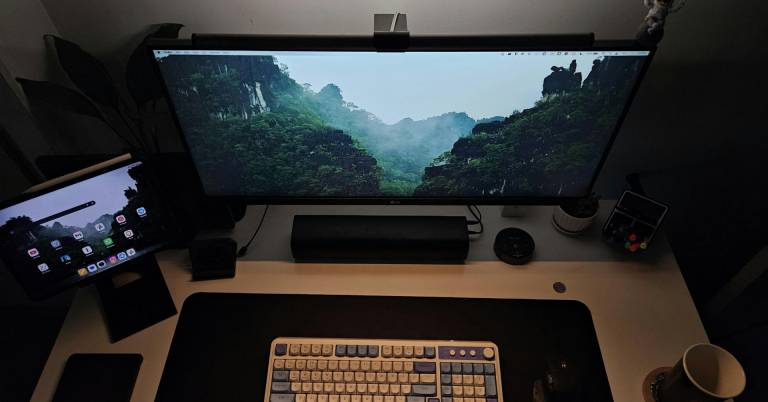
There is something liberating about a screen that stretches beyond the ordinary. A widescreen monitor from Dell doesn't just show you more pixels; it gives you room to breathe, to spread out your work, to immerse yourself fully in whatever demands your attention. Whether you are editing a timeline, tracking complex data, or simply wanting your favorite films to feel expansive, the right widescreen display transforms how you interact with your digital world.
Dell's approach to widescreen design balances thoughtful engineering with practical innovation. Their lineup includes curved ultrawide models like the Dell 34 Plus S3425DW Curved Monitor, praised for excellent screen real estate. Our focus is on matching the monitor to your workflow. We've considered connectivity options like eye comfort features that reduce fatigue during long sessions, and the real-world performance that makes these displays feel like natural extensions of your workspace. Let us help you find the Dell widescreen monitor that gives your ideas the room they deserve.
Our Top Picks

Spacious and immersive curved screen Rich color with deep contrast Smooth 120Hz responsive performance Clean single cable USB C setup
Built-in speakers are convenient but not very immersive
There is something satisfying about opening multiple windows across a 34 inch curved display and still having breathing room. The S3425DW gives that sense of space immediately. Whether you are working with spreadsheets, timelines, or stacked browser tabs, the ultrawide format helps everything flow more naturally. Visual quality adds to the experience. With 99% sRGB and 95% DCI P3 coverage, colors appear lively and accurate, while the VA panel and 3000:1 contrast ratio bring noticeable depth. HDR readiness enhances detail in brighter and darker scenes, giving content a more dimensional look without feeling exaggerated.
Motion is equally well handled. A refresh rate up to 120Hz paired with AMD FreeSync Premium keeps scrolling smooth and gameplay tear free. The ultra-low 0.03ms response time supports fast transitions, so the screen keeps up whether you are working or unwinding. Plus, the improved ComfortView Plus reduces harmful blue light emissions to 35% or less while preserving color accuracy, which is helpful during long sessions. The built in speakers are convenient but not immersive, though they work fine for meetings and casual viewing.
Single USB-C with 65W power delivery Immersive 1800R curved WQHD display Near-invisible three-sided ultrathin bezels Integrated low blue light Comfort View Plus
Monitor's substantial weight limits portability
Our research into the Dell S3423DWC reveals a monitor built around a philosophy of seamless integration. The first thing that stands out is its physical design, featuring a three-sided ultrathin bezel that, according to the specs, creates a flawless visual continuum, ideal for a multi-monitor setup or simply for an uncluttered view. This aesthetic is complemented by the expansive 34-inch curved screen. The 1800R curvature and 21:9 aspect ratio are engineered to deliver a wraparound, immersive experience, pulling you into spreadsheets, creative timelines, or cinematic content with equal ease.
Beyond the visuals, the core of the monitor’s appeal lies in its connectivity and ergonomic features. The single-cable USB-C solution is a particularly elegant innovation, consolidating video, audio, data, and up to 65W of laptop power delivery into one streamlined connection.
For extended work sessions, Dell has included Comfort View Plus, an always-on, built-in low blue light screen that is engineered to reduce eye strain without washing out color accuracy. A notable strength is the color performance of its Vertical Alignment (VA) panel, which boasts a 3000:1 contrast ratio and 99% sRGB coverage for deep, vibrant colors. The monitor's solid construction contributes to a stable, premium feel on the desk, though this robust build does mean it's less inclined to be moved frequently once positioned.
Control two PCs with one keyboard Wide viewing angles with IPS display Easy Arrange with 38 window partitions Front accessible SuperSpeed USB ports
Audio requires separate speakers or soundbar
Dell has clearly put considerable thought into how people actually work. The centerpiece is the 34 inch curved WQHD screen with 3440 x 1440 resolution, delivering crisp detail across a panoramic canvas that eliminates the need for dual monitors. Those three sided ultra thin borders keep distractions to a minimum, allowing your content to take center stage. What makes this display particularly versatile is the IPS technology, which maintains consistent color and clarity whether you're sitting dead center or glancing from an angle. For collaborative sessions or simply shifting your seating position, this matters more than specs might suggest.
Where this monitor truly distinguishes itself is in workflow architecture. The built in KVM feature, combined with Picture by Picture and Picture in Picture modes, lets you connect two different PCs and control both with a single keyboard and mouse. Editing a document on your work laptop while referencing files on your personal desktop becomes seamlessly fluid. Dell has also integrated smart software touches like Easy Arrange, which offers 38 pre set window partitions for tiling applications exactly how you prefer.
The auto restore feature remembers your window positions even after disconnecting, so you pick up right where you left off. Navigation feels intuitive thanks to the joystick control hidden beneath the bottom bezel, and the two SuperSpeed USB ports on the front provide quick access for peripherals. One minor downside is that it has no speaker. Still, the optional magnetic Dell Slim Soundbar attaches effortlessly for those wanting an integrated solution.
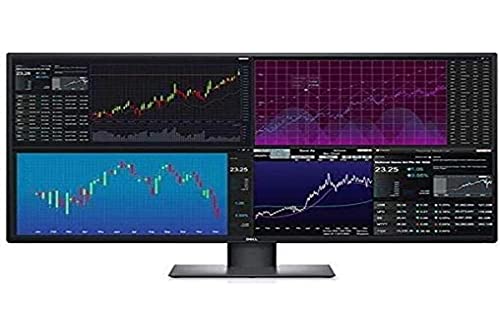
Huge 42.5 inch 4K display Crisp detail and sharp visuals Bright 350 nit screen Single cable DisplayPort connection
Quite hard to set up
The Dell U4320Q is the kind of monitor that immediately changes how your desk feels. It feels closer to having a command center than a standard monitor. The 3840 x 2160 resolution ensures that all that space remains sharp and detailed, so text, spreadsheets, and 4K video content appear crisp rather than stretched.
For movie nights or sports highlights, the 16:9 widescreen format feels natural and immersive. The LED backlight supports a wide color range and solid contrast, while 350 nits of brightness keep the screen clear even in well lit rooms. Action scenes and fast paced moments benefit from the 5 ms GTG response time, which keeps motion looking clean and controlled at its 60Hz refresh rate.
Connectivity is straightforward with DisplayPort, handling both audio and video through a single cable, simplifying your setup. The anti-glare screen also helps reduce reflections, which is useful in brighter environments. However, getting everything assembled can take a bit of patience, as it is quite hard to set up. Still, once in place, the size and clarity make the effort worthwhile.

Smooth 120Hz ultrawide performance IPS Black with strong contrast Thunderbolt 4 with 90W power Built-in KVM and daisy chaining
Supports DCI-P3 but no HDR
Spending a day in front of the U3425WE feels less like working on a monitor and more like managing a control panel. The 34 inch curved screen provides generous horizontal space, which makes handling timelines, large documents, or multiple browser windows noticeably easier. As part of the UltraSharp family, it clearly focuses on clarity and workflow efficiency.
The IPS Black panel enhances contrast and depth compared to typical office displays, and the 120Hz refresh rate gives everything a smoother edge. Scrolling through long pages or switching between apps feels fluid rather than rigid, which is refreshing in a productivity focused monitor.
Where this model truly shines is connectivity. The built in USB hub includes USB C with Thunderbolt 4 and DisplayPort Alt Mode, delivering up to 90W of power. Features such as daisy chaining, Internal Multi Stream Transport, and a KVM switch simplify multitasking across multiple computers and displays. It keeps cables under control while expanding your setup. Although it supports the DCI P3 color space, it does not offer HDR support. Even so, for office and creative workflows centered on color accuracy and multitasking, it remains a highly capable ultrawide solution.

Sharp 3440 x 1440 resolution Expansive 21:9 viewing space Reliable USB Type C connectivity Clear 300 nit brightness
The larger ultrawide footprint may not fit compact desks
The Dell UltraSharp U3423WE is designed for professionals who want a wider, more immersive workspace without stepping into oversized territory. Its 3440 x 1440 WQHD resolution offers four times the detail of standard HD, which means more spreadsheets, documents, or editing panels can stay open at once without feeling crowded. The 21:9 aspect ratio is especially satisfying when watching CinemaScope films, as the format fills the screen more naturally.
Picture quality remains consistent thanks to WLED backlighting and 300 nits of brightness, keeping visuals clear and evenly lit. Motion performance is solid as well. With a 5 ms GTG response time, fast action scenes, sports clips, or light gaming sessions remain smooth and controlled. Connectivity supports productivity, too. USB Type C enables efficient data transfer while reducing cable clutter, and HDMI allows connections to laptops, consoles, Blu-ray players, and other HD devices. It works well as a central hub for a mixed setup.
Nonetheless, the larger ultrawide footprint may not fit compact desks. That said, if you have the space, the expansive screen real estate can significantly improve how comfortably you manage your daily tasks.

Immersive 34 inch curved screen Sharp high resolution visuals Efficient USB C connectivity Wide field for multitasking
Can be disconnected sometimes
A larger screen can completely reshape your work routine, and the P3424WE proves that quickly. The 34 inch curved display pulls you into your content while giving you extra horizontal space to spread out documents, timelines, or browser tabs. For multitasking enthusiasts, that added field of view can make switching between tasks feel less cramped and more natural.
Visual clarity plays a big role here. The high resolution panel delivers sharp details and vibrant colors, which benefits everything from creative projects to streaming your favorite shows after hours. Text appears crisp, and images carry enough depth to make long sessions comfortable on the eyes. USB C connectivity simplifies the desk setup. With rapid data transfer and device charging through a single cable, it reduces clutter and keeps things efficient. It is especially helpful for laptop users who prefer a clean, streamlined workspace.
There are occasional moments when it can be disconnected, which may require a quick reconnection. Even so, once everything is properly in place, the overall experience remains productive and immersive for daily use.
What to Look For in a best dell monitor for widescreen?
Buyers are frequently hesitant to purchase best dell monitor for widescreen. Certain factors should be considered while making a significant purchase. Our understanding and expertise with best dell monitor for widescreen will assist you in making the right decisions.
Please take the following points into consideration before selecting best dell monitor for widescreen:
Response Time
Connections
Panel Type
Brightness
Screen Size
Aspect Ratio
Refresh Rate
Resolution
FAQs
Are Dell widescreen monitors good for productivity?
Yes, Dell widescreen monitors are excellent for productivity. The expanded screen space allows you to open multiple windows side by side, improving workflow efficiency.
Is an ultrawide Dell monitor better than dual monitors?
An ultrawide monitor can replace a dual-monitor setup by providing a seamless display without bezels in the middle. However, some users still prefer dual monitors for flexibility.
Are Dell widescreen monitors good for gaming?
Many Dell widescreen models support high refresh rates and adaptive sync, making them suitable for immersive gaming as well as professional use.
We constantly update the list of best dell monitor for widescreen as new data becomes available. For the most up-to-date information, please visit our website regularly.
Please feel free to contact us if you have any queries or concerns with best dell monitor for widescreen. If you ask, we'll do our hardest to help you in any way we can!
About Michael Brown