The Best Benq Dlp Hdmi Projector For 2026
 By, Michael Brown
Updated
Summary

BenQ DLP MS524 Projector

BenQ WXGA Projector MW560
BenQ TH575 Projector
BenQ has long been associated with DLP projectors, a technology valued for sharp image reproduction, strong motion handling, and a compact optical design. Add HDMI connectivity, and these projectors become much easier to pair with laptops, streaming devices, game consoles, and other modern sources. That combination makes a BenQ DLP HDMI projector useful for everything from presentations and classrooms to movies and casual entertainment.
Choosing between them, however, requires looking beyond the BenQ name and the presence of an HDMI port. Resolution, brightness, contrast, throw distance, connectivity, and intended environment can make two DLP projectors feel very different in actual use. A bright business projector, for example, may perform better in a lit meeting room, while a home-focused model may put greater emphasis on color and cinematic picture quality.
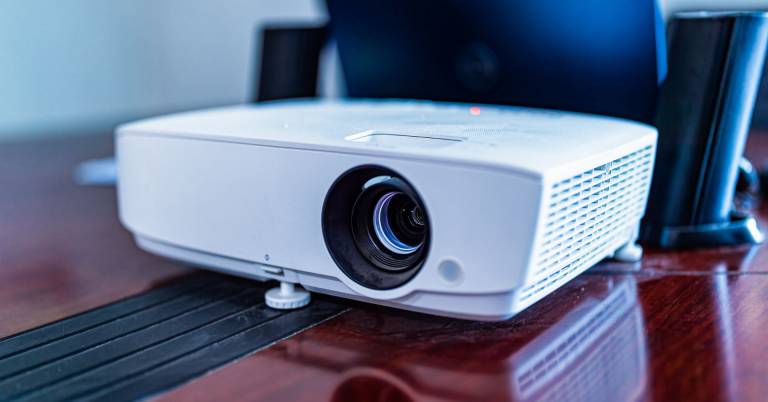
The BenQ DLP MS524 Projector represents the practical side of this category particularly well. Designed around straightforward projection and convenient HDMI connectivity, it makes sense for users who prioritize reliable everyday performance over premium home theater extras.
There is plenty of variety within BenQ's DLP lineup, so the right choice ultimately depends on where and how you plan to use it. Our recommendations explore those differences, from practical everyday models to options better suited to entertainment and more demanding viewing setups.
Our Top Picks


Compact travel-friendly body Long-lasting lamp Modern and legacy inputs Energy-saving SmartEco mode
No built-in wireless connectivity
A presentation feels much easier to follow when the picture stays crisp even before the room lights go down. With 3,200 ANSI lumens and a 13,000:1 contrast ratio, the BenQ MS524 is designed to keep slides, charts, and video visible in small to medium spaces while giving darker details enough separation to remain clear.
Its SVGA display is best suited to everyday documents and standard presentation material. Color accuracy and defined shadows help visual content look more polished, while the 1.96 to 2.15 throw ratio creates a 50-inch image from roughly two meters away. That makes placement fairly predictable in meeting rooms where the projector cannot sit directly beside the screen.
Frequent travelers may appreciate the compact form, especially when a projector has to move between offices or classrooms. HDMI and two VGA inputs also make it easier to work with both newer laptops and older workplace equipment. Meanwhile, SmartEco technology reduces power use, and the lamp can last up to 10,000 hours, so routine use should involve less maintenance.
The only drawback is that the wireless connectivity is not built in, but an HDMI streaming adapter can add that flexibility when cable-free playback is needed.

Excellent room brightness Clear spreadsheet presentation Quick automatic alignment Convenient dual HDMI Efficient SmartEco operation
WXGA rather than Full HD
When a meeting starts in five minutes, no one wants to spend that time wrestling with the projector. The BenQ MW560 keeps the routine simple through an ergonomic retractable foot and automatic vertical keystone correction, helping the image line up quickly on a wall or screen.
Once the presentation begins, 4,000 ANSI lumens provide enough output for bright offices and classrooms. The 20,000:1 contrast ratio adds definition between text, backgrounds, and graphics, while the dedicated Data Review Mode is particularly useful for spreadsheets and reports because it emphasizes the clarity of letters and numbers. As a result, detailed slides remain easier to scan from across the room.
Two HDMI ports allow a laptop and another source to stay connected at the same time, and VGA support accommodates older equipment that still appears in many workplaces. This practical mix reduces cable swapping when several people need to present. SmartEco Mode also lowers lamp power consumption by as much as 70%, which is helpful for a projector used throughout the week.
The WXGA resolution favors clear business content over Full HD detail. For slides, documents, and training material, however, the extra brightness and readable presentation modes are likely to matter more.

Immersive 100-inch gameplay Bright Full HD picture Responsive controller input Strong dark-scene detail Easy image alignment
No HDR Support
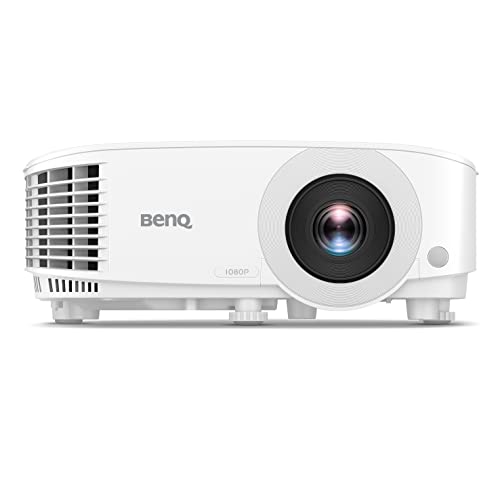
Few upgrades change the atmosphere of a gaming session as dramatically as moving from a monitor to a 100-inch picture. The BenQ TH575 can produce that size from about 10.8 feet away, creating an immersive view without requiring an unusually deep room.
Its 3,800 ANSI-lumen output helps colorful environments remain lively when some ambient light is present. At the same time, Full HD resolution keeps character models and interface elements sharp, while the 15,000:1 contrast ratio brings more definition to dim corridors and nighttime scenes instead of letting them appear washed out.
Responsiveness receives equal attention. A 16ms input lag at 1080p and 60Hz keeps controls feeling immediate for casual competition, action adventures, and sports titles. The DMD's fast response further supports smooth movement, so quick camera turns look cleaner on the large image. Auto vertical keystone and 1.1x zoom then make the initial setup easier to manage.
HDR is not supported, so the TH575 relies on its brightness, contrast, and Rec.709 color performance for visual impact. Those strengths still create an enjoyable, punchy picture for players whose libraries are mainly built around Full HD content.

Exceptionally wide color gamut Precise factory-calibrated color Flexible lens positioning Nuanced HDR shadow detail
Basic Gaming Performance
Some projectors make an image bigger; the HT5550 tries to preserve what makes the image cinematic in the first place. True 4K UHD resolution places 8.3 million distinct pixels on screen, revealing fine textures in costumes, scenery, and production design without the softness that can distract on a large projection surface.
Color is the real centerpiece. Coverage of 100% DCI-P3 and 100% Rec.709 gives filmmakers' palettes room to breathe, while individual factory calibration is intended to provide accurate color straight out of the box. HDR-PRO adds HDR10 and HLG support, then uses enhanced tone mapping, Active Iris, and Dynamic Black processing to retain detail in both bright highlights and shadowy scenes.
Motion Enhancer helps camera movement look more fluid, which can be useful during sweeping landscape shots or fast action sequences. Installation is also more accommodating than a basic fixed setup: two-dimensional lens shift and a 1.6x zoom allow the picture to meet the screen without forcing the projector into one exact position.
Gaming performance is fairly basic compared with a purpose-built low-latency model. The HT5550 makes the most sense when film accuracy and flexible theater installation take priority over competitive play.

Ultra-responsive gaming modes Detailed 4K visuals Clearer dark environments Flexible two-axis correction Useful 1.3x zoom
Built-in speaker is only 5W
Input lag becomes much more noticeable when every movement fills a huge screen, which is why the TK700's speed matters. It can reach about 4ms at 1080p and 240Hz, 8ms at 120Hz, or 16ms at 4K and 60Hz, giving players the option to prioritize maximum responsiveness or richer resolution according to the game.
Dark environments receive thoughtful treatment through BenQ's Black Detail Enhancement. It draws out approaching enemies, hidden objects, and environmental texture without flattening brighter portions of the image, helping moody scenes remain atmospheric as well as playable. True 4K support then brings finer detail to expansive maps and movie content when speed is not the only priority.
Room setup is manageable thanks to two-dimensional keystone correction, which squares the image when the projector cannot sit perfectly centered. A 1.3x zoom also offers some freedom in throw distance, reducing the need to redesign the entire room around the screen. The built-in 5W speaker is convenient for getting started, though an external soundbar or speaker system will better match the scale and energy of the projected image.

Detailed zone-based contrast Rich cinematic color Broad HDR format support Flexible picture placement
No Bluetooth or Wi-Fi audio
A dark movie scene can lose its atmosphere when shadows collapse into a single gray mass. The HT3560 addresses that problem with HDR-PRO, HDR10+, HLG, tone mapping, and Dynamic Black, analyzing the picture so small details remain visible without draining the intensity from bright highlights.
Local Contrast Enhancement divides the image into more than 1,000 zones, allowing different areas of the frame to receive more precise treatment. Combined with 8.3 million pixels and a 3840 x 2160 image, this gives landscapes, facial details, and fine background textures a convincing sense of depth. Color also receives serious attention through 95% DCI-P3 and 100% Rec.709 coverage, with dedicated enhancement for saturated shades, gradients, and natural skin tones.
Installation should be less stressful than the specifications might suggest. Auto vertical and manual horizontal keystone correction help square the picture, while vertical lens shift and 1.3x zoom provide additional placement freedom. HDMI 2.0b, S/PDIF, and eARC support make it easier to pass high-quality audio to a separate system. Nevertheless, Bluetooth and Wi-Fi audio transmission are not available, so speakers connect most naturally through the projector's wired audio options or the playback device.

Fast 120Hz response Bright living-room image Vivid HDR-compatible color Tuned built-in audio Convenient automatic keystone
No VGA-in or monitor-out
Competitive play on a projected image only works when controls still feel connected to the action. At 1080p and 120Hz, the TH685P reaches an 8.3ms input lag, while its dedicated Game Mode and Game Sound Mode tune the picture and audio around faster-paced content.
Brightness is another everyday advantage. The 3,500 ANSI-lumen output helps the image hold up in a living room with some lights on, and the projector can create a 100-inch picture from about 8.2 feet away. Its Full HD native resolution is paired with support for 4K inputs and HDR10, producing brighter highlights, deeper black levels, and 95% Rec.709 color for games, sports, and films.
Sound is handled by an integrated 5W treVolo speaker with an equalizer. It will not replace a full surround setup, but it makes spontaneous sessions simpler because separate audio is not essential from the start. LumiExpert is also designed to ease eye strain during longer play, while automatic keystone correction helps straighten the image during setup. Although there is no VGA-in or monitor-out connection, HDMI covers the modern consoles and media devices that this projector is most likely to accompany.
What to Look For in a best benq dlp hdmi projector?
Until now, numerous customers trust the information and advice we offer them, which means our offers to you are accurate and up to date all the time. This objective is being pursued with tremendous zeal and attention.
It's necessary to keep in mind the following points for selecting best benq dlp hdmi projector:
Connection Methods
Component video, composite video and S-Video all make up the most common connections on large projectors. We're also seeing more projectors that offer direct USB connection to computers via a USB cable. A growing variety of projectors now have USB Type-C ports. The majority of USB-C ports can be used to transfer data or video using the DisplayPort protocol. Most USB-C ports support USB Power Delivery (USB PD), which means that a plugged in projector can supply 100 watts of power to charge a device or to charge it using a USB-C cable (assuming the device is capable of charging over USB-C).
Portability
Brightness
The ambient lighting level, size and material of your projector screen will all affect the brightness. You should buy a professional seller if you are installing a projector in a permanent location, such as at your home, to ensure that you get the best image brightness and the correct screen material.
Contrast Ratio
Contrast ratings can only be used to measure in dark rooms. They don't give any information about ambient lighting. Unusually dark blacks in the projector will result in lower contrast. A brighter projector will perform well in home theaters, but not in living rooms or offices.
Resolution
The calculation for projectors that have 4K ultra high definition (3,840 x 2,160 pixels) is slightly different.
Projection Tech
DLP projectors with single-chip DLP chips could be subject to the so-called "rainbow effect." Sometimes, tiny, bright flashes with rainbow-like colors may appear, especially in dark scenes. Some DLP projectors have a minimal effect, while others can produce a distracting result, especially when there are bright areas against shady backgrounds. The rainbow effect is not a problem with LCD projectors, which are safer if someone in your household has sensitive eyes. There are many DLP projectors that produce excellent images.
Light Source
For longer periods of time, LEDs and lasers retain a greater percentage of their original brightness. While all light sources eventually lose their brightness, lamps lose the most in 500 hours. Then, they slowly decline over time. The brightness of LEDs and lasers will decrease more slowly over the course of their lifetimes.
FAQs
What is a BenQ DLP projector?
A BenQ DLP projector uses Digital Light Processing technology to create sharp images with good detail and smooth motion.
Are BenQ DLP projectors good for movies?
Yes. Many BenQ DLP models offer strong contrast, detailed images, and accurate colors that work well for home movie viewing.
Why is HDMI important on a projector?
HDMI makes it easy to connect devices such as laptops, streaming players, gaming consoles, and Blu-ray players to the projector.
About Michael Brown