The Best Tablet For College Students Of 2025
 By, Michael Brown
Updated
Summary

Apple iPad Air 11-inch M3

Samsung Galaxy Tab S6 Lite

Amazon Fire HD 10 10.1" tablet
College today is built around mobility, flexibility, and staying connected. That’s why the modern student needs a device that adapts seamlessly to every part of their academic life. A great tablet brings together power, portability, and versatility in one sleek package. It lets you take handwritten notes in class, read digital textbooks without added weight, join video calls with crisp clarity, and switch instantly from studying to streaming when it’s time for a break. For many students, a well-chosen tablet becomes an essential tool that elevates both productivity and creativity.
Of course, not all tablets are created equal. Some excel at multitasking and replace a full laptop, making them ideal for demanding majors. Others deliver long battery life and portability for students who are constantly on the move. Features like display quality, storage capacity, stylus compatibility, and keyboard support all play a major role in shaping the experience.
In this guide, we will highlight the best tablets for college students and explain what sets each one apart. Whether you're looking for a budget-friendly learning tool or a premium model built for advanced coursework, you’ll find options that upgrade every part of student life.
Our Top Picks


Fast M3 chip processing Gorgeous Liquid Retina screen Helpful Apple Intelligence tools Long-lasting all-day battery
Touch ID is slightly less convenient
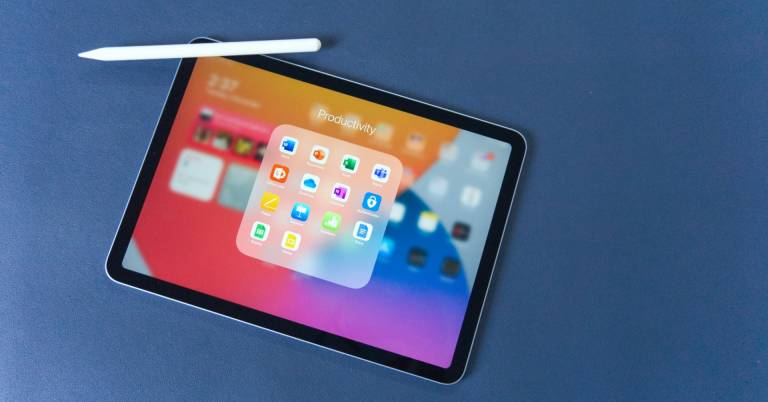
College routines shift fast, and the iPad Air 11-inch M3 keeps up with that pace effortlessly. Its M3 chip handles everything from research-heavy assignments to graphic-intensive apps, making it ideal for students who need a device for both academics and downtime. The all-day battery is especially handy on long campus days when outlets are scarce, letting you move from lectures to library sessions without thinking about power.
The Liquid Retina display enhances reading, design work, and streaming, thanks to P3 wide color and True Tone. Paired with Apple Pencil support and iPadOS features like Scribble and Stage Manager, it becomes a flexible workspace where juggling apps, editing photos, or writing papers feels smooth and intuitive. And Apple Intelligence helps with writing, organizing, and expression — all while keeping your data protected within the device.
Although Touch ID takes an extra beat compared to the instant access of Face ID, it remains reliable and secure once you get into the rhythm. Overall, the iPad Air M3 fits effortlessly into the daily flow of a college student who needs performance, portability, and a refined software experience.

S Pen included for notes Slim, lightweight modern design Strong display and audio combo Useful Samsung DeX multitasking
microSD card and charger sold separately
The Tab S6 Lite easily slips into campus life, especially since the S Pen comes included and ready to use. Taking notes in class, annotating PDFs, or sketching quick ideas becomes a natural part of your workflow, and switching to photo or video edits is just as simple. The tablet’s lightweight, modern build also helps when you’re constantly on the move, and the new Mint color adds a fresh touch for students who enjoy a bit of style.
When you want to relax, movies and games become much more enjoyable with a clear screen, Samsung's newest processor, and Dolby Atmos surround sound. Samsung DeX gives your productivity another boost by letting you turn your tablet into a desktop-like workplace and better manage several windows. It's a useful choice when you have a lot of work to do.
As for storage expansion and charging, you’ll need to pick up a microSD memory card and a Type-C charger separately, though the tablet’s overall versatility still outweighs those extra purchases. Altogether, the Tab S6 Lite brings a great mix of creativity tools and entertainment perks.

Smooth 25% faster performance Bright 1080p Full HD screen Durable, lightweight build Long-lasting 13-hour battery
Cameras and speakers are basic
College days often jump between classes, downtime, and quick study sessions, and the Fire HD 10 keeps pace nicely. With 25 percent faster performance and 3 GB of RAM, switching between streaming lectures, reading, or playing a light game is pleasantly straightforward. The 10.1-inch 1080p Full HD screen makes everything look better and more colourful, whether you're watching a show before bed or going over slides. Its 13-hour battery lasts through a whole day, which is great if you don't often have access to an outlet.
The tablet’s slim, durable design also makes it a dependable companion for campus bags. The strengthened aluminosilicate glass offers peace of mind, especially if you’re known to juggle books, notebooks, and coffee all at once. Students who enjoy taking handwritten notes can pair it with the Made for Amazon Stylus Pen, which responds smoothly thanks to 4,096 levels of pressure sensitivity. Extra tools like quick webpage summaries and polished email assistance further support productivity.
Its cameras and speakers lean toward the simple side, though they still handle casual video calls and everyday media well enough for student life. Overall, the Fire HD 10 is a practical pick for budget-conscious college users who value durability and long entertainment-focused sessions.

Fast A16 chip performance Sharp 11-inch Retina display Long all-day battery life Strong app ecosystem support
60 Hz display
What stands out first with this iPad is how effortlessly it switches between different student tasks. One moment you’re editing a video for a class project, and the next you’re jumping into a game or sorting through photos, all powered by the superfast A16 chip. The all-day battery lets you move through lectures, library sessions, and late-night assignments without having to plan around a charger. Storage options up to 512GB also make it convenient to keep course materials, media, and apps all in one place.
The 11-inch Liquid Retina display adds vibrant clarity for sketching, watching movies, or reviewing readings. True Tone adjusts the screen based on your environment, which helps during long study stretches under different lighting. iPadOS contributes to the smooth workflow by supporting side-by-side apps, Scribble for handwritten input, and huge app variety tailored for learning and creativity.
Plus, students who want to draw or type more comfortably can expand their setup with the Apple Pencil or Magic Keyboard Folio. Although the display refresh rate stays at 60 Hz, it still delivers a pleasant viewing and working experience for everyday college needs.

Powerful JBL speaker system Sharp 11.5-inch 2K screen Smooth 90Hz visual experience Kickstand and folio case included
Frequent updates with slight lag
Instead of easing in quietly, the Tab Plus greets you with sound that instantly sets it apart. The Octa JBL speaker system, supported by Dolby Atmos, fills your space with rich audio, whether you’re studying with music in the background or turning your room into a quick mini-party. The 175-degree kickstand makes it surprisingly convenient to watch lectures or shows without juggling pillows or stands. And if you ever want to ditch the screen and just enjoy music, switching to Bluetooth speaker mode keeps the vibe going.
Visually, the 11.5-inch 2K display brings crisp detail and lively colors, helped by TÜV-certified eye care for long evenings of reading or gaming. The MediaTek Helio G99 processor and 90Hz frame rate make games and ordinary surfing smoother, letting downtime feel more fluid. Standby Mode and other features are nice since they convert the tablet into a digital frame or clock when it's plugged in.
It’s true that frequent software updates and the occasional bit of lag can interrupt the momentum, yet the long-term security support and strong entertainment features still make the experience worthwhile.

Sharp 11-inch 2.5K display Smooth 90Hz AdaptiveSync motion Quad speakers with Dolby Atmos Durable metal unibody design
Not ideal for heavy multitasking
What you notice right away with the Redmi Pad 2 is how pleasant the screen is to use. The 11-inch 2.5K panel displays over a billion colors, so scrolling through textbooks, watching videos, or browsing social apps always looks lively and crisp. The adaptive 90Hz refresh rate steps in whenever movement speeds up, making transitions smoother and reducing motion blur. It brings a nice layer of polish, especially when switching quickly between apps or flipping through long reading materials.
Audio is another highlight. The quad speaker setup, enhanced with Hi-Res Audio and Dolby Atmos, creates fuller sound than you’d expect at this price point. Combined with the TÜV Rheinland eye-care certifications and flicker-free display, longer study nights or movie sessions feel easier on the eyes and ears. The metal unibody also keeps the tablet feeling sturdy and clean, available in subtle and playful colors.
While the tablet handles everyday student tasks well, it is not ideal when too many demanding apps run at once. Still, for typical classwork, streaming, and casual gaming, it keeps things running steadily and delivers strong value overall.

Fast Snapdragon 8 Gen 3 chip Large, crisp 12.1-inch display Strong six-speaker audio system Rapid 80-minute full charging
No SIM card slot
The OnePlus Pad 2 steps in as a strong choice for students who want laptop-like power in a portable form. Its Snapdragon 8 Gen 3 chip and Adreno GPU combine to deliver smooth performance, whether you’re working through research tabs, editing photos, or settling into a gaming break. Thanks to 12GB RAM and 256GB of storage, juggling large files or streaming alongside apps doesn’t slow things down. The anodized metal finish not only looks premium but also resists scratches, making it reassuring to toss in a backpack.
Also, the 12.1-inch screen has a resolution of 3000x2120, which makes details look sharp, and it can become as bright as 900 nits, which is great for studying outside or in bright classrooms. Paired with a fast 144Hz refresh rate and six-speaker audio, lectures, videos, and games feel immersive. Productivity tools such as AI Eraser 2.0, Smart Cutout, and the AI Toolbox make small tasks noticeably easier, and using the OnePlus Stylo can add extra precision for notes or creative work.
Nevertheless, there is no SIM card slot. Even so, students who mostly rely on Wi-Fi will still get a powerful, fast, and visually impressive tablet that handles school and downtime effortlessly.
What To Know About The best tablet for college students Before Purchasing It
There are numerous factors to consider buying a product. In the section below, we will give you some key points to pay attention to prior to buying a best tablet for college students. Of course, It’s indispensable for buyers to do some research before making a purchase so that they won’t end up with something that can’t meet their expectations.
In this post, with our useful and available tips for shopping, we will make it easier for you to select and make the best decisions when tending to own the best tablet for college students. Here is your area! Give it your attention and make it your assistant.
Battery
Storage
Cameras
Software
Online Access
Hardware Connections
Screen & Audio
FAQs
What is the best tablet for college students overall?
Many students prefer the iPad Air or iPad Pro for their powerful performance, long battery life, and wide app support. However, budget-friendly options like the standard iPad or Samsung Galaxy Tab also work very well for everyday classwork.
How much storage do students need on a tablet?
For notes, textbooks, and regular apps, 64GB to 128GB is usually enough. Students working with large design files, videos, or creative projects should consider 256GB or more.
Do I need a stylus or keyboard for college use?
A stylus is great for handwritten notes, diagrams, and highlighting. A keyboard is helpful for essays and multitasking. While not required, both accessories can make studying and productivity much easier.
Conclusion
Hopefully, our sharing above will take you much closer with your best tablet for college students. The model we suggested for you is equipped with all things you may need. Nevertheless, suppose you have a fancy for another one, we highly recommend OnePlus Pad 2 12.1". To conclude, we wish you a pleasant shopping time. And if there is any problem related to this article that you wonder about, please contact us soon for timely answers. It's our pleasure to serve you!
About Michael Brown