The 7 Best 4k Oled Monitor For 2025
 By, Michael Brown
Updated
Summary

ASUS Swift 32” 4K OLED Monitor

ViewSonic VX1655 4K OLED Monitor

Dell 32 Plus 4K S3225QC OLED Monitor
If you’re serious about visual quality, whether for gaming, content creation, or professional design work, a 4K OLED monitor is a game-changer. Unlike traditional LCD screens, OLED technology delivers perfect blacks, incredible contrast, and vibrant, lifelike colors that make every image pop. From the tiniest details in your designs to cinematic scenes in your favorite movies, everything looks sharper, richer, and more immersive.
Choosing the right 4K OLED monitor, however, can be overwhelming. Some excel in color accuracy for creative work, while others prioritize fast refresh rates and low response times for competitive gaming. Size, connectivity, and ergonomic features also play a huge role in making your setup comfortable and productive.
That’s why we’ve compiled a list of the best 4K OLED monitors available today, highlighting models that balance stunning visuals with practical performance. Whether you’re a designer seeking precise color reproduction, a gamer craving fluid motion and deep contrast, or someone who simply wants the ultimate viewing experience, our guide helps you find the perfect monitor.
Our Top Picks


Ultra-fast 240 Hz motion Excellent HDR contrast depth Advanced cooling and protection Accurate wide color coverage
A bit pricey
There is something satisfying about powering on the ASUS Swift 32-inch 4K OLED for the first time. The combination of a 240 Hz refresh rate and a near-instant 0.03 ms response time gives motion an effortless flow, making fast-paced games look wonderfully clean. The QD-OLED panel brings scenes to life with deep contrast and rich color, helped along by its VESA DisplayHDR 400 True Black certification and wide 99% DCI-P3 gamut.
Even during long sessions, this monitor stays impressively stable. ASUS’s custom heatsink, airflow design, and graphene film work quietly in the background, reducing heat and lowering burn-in risk without calling attention to themselves. Creators will enjoy the uniform brightness option, which keeps luminance steady, and the accurate Delta E < 2 color difference adds confidence when working on detailed projects. Adjusting settings is simple too, thanks to DisplayWidget Center, which lets you manage OLED Care and fine-tune visuals with just a mouse.
The only catch is the price, and it may give some buyers a moment of hesitation. Still, the performance and thoughtful engineering soften that concern, especially for those who want a display built for both gaming and creative precision.

Detailed 4K OLED clarity Flexible portrait and landscape Clean cable-hidden design Helpful two-way USB-C charging
Built-in speakers are not very good
Setting up the ViewSonic VX1655-4K-OLED feels almost too easy. This monitor opens up into a surprisingly stable kickstand that keeps everything tidy, with the connectors tucked behind the panel so your workspace stays clean. Its 4K OLED display immediately shows its strength through razor-sharp details and rich color depth, giving both productivity tasks and entertainment a noticeable lift. Switching between portrait and landscape mode also becomes a small convenience you end up appreciating more than expected, especially when dealing with documents or vertical content.
Moreover, with two USB-C ports that support two-way charging, plus mini HDMI and a headphone jack, you can plug it into a range of devices without fuss. Its extremely thin profile makes it easy to carry around, turning coffee shops, hotel rooms, or even park benches into comfortable workspaces.
The only downside is that the built-in speakers are not very good. Even so, the monitor’s portability, crisp OLED quality, and thoughtful design easily outweigh that limitation.

Rich QD-OLED visual quality Impressive spatial audio system Handy pop-out quick ports Easy single cable setup
No instructions provided
The Dell 32 Plus 4K S3225QC OLED makes a strong first impression. The 4K panel, QD-OLED technology, and Dolby Vision all work together to fill the screen with sharp details and deep contrast. This makes both creative work and entertainment appear great. Its 99% DCI-P3 coverage keeps colours rich and true, and AMD FreeSync Premium Pro, the 120 Hz frame rate, and the very fast 0.03 ms response time keep motion constant.
What catches you off guard, though, is the audio. Instead of thin, typical monitor speakers, this one integrates five 5W speakers with spatial audio and AI-driven head-tracking. The sound follows your movement in a surprisingly natural way, giving games and videos a more engaging presence without external equipment.
Practical touches show up throughout the design. A single USB-C cable handles power delivery up to 90W, reducing clutter instantly, and the pop-out quick access ports make connecting peripherals feel effortless. Long hours are easier on the eyes thanks to ComfortView Plus, which reduces blue light while maintaining accurate color.
The only downside is that it arrives without instructions, so the setup may involve a bit of guessing. Once everything is in place, though, the experience smooths out quickly.

Crisp 4K at 240 Hz Flexible 4K or 480 Hz mode Ultra-fast 0.03 ms response Immersive panel-driven audio
Some VRR flicker during frame changes
Powering on the LG 32GS95UE feels like opening the door to a new level of gaming. The 4K OLED panel running at up to 240 Hz brings smooth motion and sharp detail together in a way that makes fast action look incredibly fluid. Scenes transition effortlessly thanks to the nearly instant 0.03 ms response time, and the deep blacks from its DisplayHDR True Black 400 rating add striking contrast to darker environments.
One of the most interesting touches is Dual Mode. You can switch between 4K at 240 Hz and Full HD at 480 Hz, depending on whether you want the clearest picture or the fastest speed. Both NVIDIA G-SYNC and AMD FreeSync Premium Pro keep the game stable, so you can pursue fast-paced moments without worrying about tearing.
Pixel Sound adds an unexpected element by streaming sound straight through the panel, making effects feel more related to what's happening on screen. HDMI 2.1 and DisplayPort 1.4 make it easy to connect, and the anti-glare design stops things from getting in the way during bright sessions. There can be some VRR flicker when frame rates shift quickly, though many users find it manageable once settings are dialed in. With everything else this monitor offers, that small quirk becomes easier to overlook.

Sharp 4K with high PPI Smooth 240 Hz motion Effective Glare Free finish Immersive CoreSync lighting
Not as strong in very bright rooms
The SAMSUNG 27-inch OLED G8 takes the idea of a compact gaming monitor and turns it into something far more dramatic. That high pixel density on a 27-inch panel makes every texture, shadow, and particle look incredibly crisp, and exploring new environments becomes strangely absorbing. It helps that the monitor shrugs off most reflections with its Glare Free finish, keeping distractions at bay even when sunlight sneaks into the room. Dark scenes look even more dramatic, as the TrueBlack 400 capability uncovers details you might normally overlook.
Fast-paced gaming is where this display loosens up and shows its full potential. The 240 Hz refresh rate and 0.03 ms response time make rapid movement look clean and controlled. With G-Sync compatibility paired with AMD FreeSync Premium Pro, moments that would usually tear or stutter come through smoothly.
Samsung gives a surprising amount of attention to longevity, too. And when CoreSync and CoreLighting Plus glow against the wall, the room subtly shifts into the world you are playing in. While OLED panels can be less dominant in bright, sun-filled rooms compared with high-brightness LCDs, most players find the tradeoff worth it once the screen’s rich contrast and atmosphere take over.

Ultra-vivid QD-OLED color Smooth 240 Hz motion Helpful AI-based enhancements Convenient 90W USB-C power
The slim top bezel limits webcam placement
The MSI MPG 321URX OLED arrives with the kind of presence that makes you pause for a moment before even turning it on. The QD-OLED panel paints scenes with vivid saturation and clean contrast, and the DisplayHDR True Black 400 rating brings darker areas to life in a way that adds shape and texture instead of flattening them out. Fast motion looks exceptionally smooth thanks to the 240 Hz refresh rate and that snappy 0.03 ms response time, turning quick turns or fast combat into fluid, effortless transitions.
The Quantum Dot colour and Mystic Light illumination work together to offer the display a unique look. The colors pop, and the glow adds just enough atmosphere without overwhelming the room. Gaming Intelligence AI steps in quietly, tweaking performance where needed so you can settle in and focus on what is happening onscreen. The adjustable stand also makes it easy to set the height and angle just right for long sessions.
One thing to note is that the upper bezel is slim enough that certain webcams sit directly against the panel, which might make some users cautious. Still, many find that choosing a lighter or clip-based webcam keeps things comfortable without affecting the display itself.
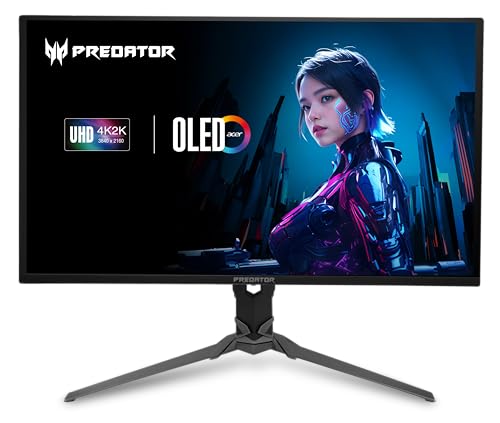
Accurate OLED color Ultra-smooth 240 Hz motion Comfort-focused eye protection Flexible ergonomic adjustments
Large size requires ample desk space
Once the Predator X32 lights up, the OLED panel immediately displays its capabilities. The 4K UHD resolution looks crisp at this size, and the true 10-bit color adds depth that makes each scene feel more dimensional. Thanks to the contrast of OLED and the support of DisplayHDR True Black 400, dark spaces hold detail instead of drowning it, while bright colors push forward with surprising intensity. And because the monitor includes image retention control, you can stay in those worlds longer without worry.
Movement-heavy games flow beautifully. The 240 Hz refresh rate paired with a rapid 0.03 ms response time keeps motion clean and steady, and AMD FreeSync Premium Pro smooths out those moments that would typically tear or jitter. It turns fast-paced gameplay into something more controlled, even when the action gets chaotic.
Acer’s stand adjustment helps find a comfortable angle, whether you’re grinding through long nights or settling in for a quick match. The screen size is just right for your field of view, while the blue light filter and glare reduction make extended sessions more comfortable. Even with its 31.5-inch size occupying a significant portion of the desk, most users find the extra space worthwhile given the impressive performance and experience the screen delivers.
Things To Look For When Buying best 4k oled monitor
There are numerous factors to consider when looking for the best 4k oled monitor to purchase. The easiest way to figure out the right one is to read reviews from people who have already purchased it.
Throughout this article, we will go over certain most important factors to consider when purchasing best 4k oled monitor. Please take your time reading and studying the items listed below!
Response Time
Refresh Rate
Brightness
Aspect Ratio
Panel Type
Resolution
Screen Size
Connections
FAQs
What is a 4K OLED monitor?
A 4K OLED monitor features a 3840 x 2160 resolution with OLED technology, offering perfect blacks, vibrant colors, and superior contrast for an immersive visual experience.
Are 4K OLED monitors good for gaming?
Yes. Many 4K OLED monitors have fast refresh rates and low response times, providing smooth motion and stunning visuals for competitive and casual gaming alike.
Can I use a 4K OLED monitor for professional design work?
Absolutely. OLED displays offer excellent color accuracy, deep blacks, and precise details, making them ideal for graphic design, photo editing, and video production.
Conclusion
The best 4k oled monitor would be those who suit your needs and demands at the lowest possible cost. With more and more options available, it could be simple to find a design that satisfies all of these criteria. If you're not sure which one is best for you, take into account the Acer Predator 4K OLED Monitor for another option.
About Michael Brown