The 7 Best 21 Inch Monitor For 2026, Tested And Researched
 By, Michael Brown
Updated
Summary

Acer 21.5 Inch Monitor

Acer KB220Q H2bi 21.5" Monitor

Packard Bell airFrame 21" Monitor
In a world of expansive screens, the 21-inch monitor holds a special place for its blend of crisp detail and space-saving design. It offers a versatile and focused workspace perfect for productivity, education, or as a reliable secondary display, delivering a sharp Full HD image without dominating your desk. Whether you need a dependable screen for office tasks, a compact companion for a small home office, or an affordable option for a multi-monitor setup, this size provides efficient performance and everyday value.
The ideal 21-inch monitor for you will emphasize sharp image quality and practical ergonomics to support comfortable, extended use. A model like the Acer 21.5 Inch Monitor exemplifies these priorities, recognized for its reliable performance, slim bezels that maximize screen space, and a clean, professional design suitable for any environment.
We simplify your search by focusing on the qualities that matter most in a compact display. Our evaluation considers user reviews on durability, professional assessments of color accuracy, and the practical aspects of connectivity and adjustability. This guide will help you choose the best 21-inch monitor that delivers comfortable viewing and dependable build quality for your daily tasks.
Our Top Picks


Sharp Full HD IPS display Slim, lightweight design Smooth 4ms response time HDMI and VGA connectivity
No display pivot adjustment
The Acer SB220Q bi keeps things straightforward, and that’s part of its appeal. The 21.5-inch IPS display delivers a crisp 1920 x 1080 resolution, making text sharp and images clean for daily tasks. Color reproduction stays consistent across viewing angles, which is helpful when switching between work and entertainment or sharing the screen with someone nearby. Acer also highlights an extremely high contrast ratio, helping brighter scenes pop while keeping darker areas more defined.
Responsiveness is handled well with a 4ms response time, which is fast enough for casual gaming and smooth video playback. The monitor’s slim profile and light weight make it easy to place or move around, especially in smaller workspaces. Connectivity is kept flexible with both HDMI and VGA inputs, allowing it to work with newer systems as well as older hardware. Practical touches like the Kensington lock slot add a layer of security, which is useful in shared environments.
One minor downside is that the display does not support pivot adjustment. That said, the fixed orientation works fine for standard desk setups, and the monitor still delivers reliable performance for everyday use.

Smooth 100Hz refresh rate Fast 1ms response time Adaptive-Sync for tear-free gaming Slim, near bezel-less design
No DisplayPort connection
The KB220Q H2bi focuses on motion clarity, and it shows once things start moving on screen. Its 1920 x 1080 resolution keeps text sharp and images clear, whether you’re browsing, watching movies, or jumping into a game. Color reproduction stays lively, giving games and videos a bit more punch without overwhelming the picture. The 16:9 aspect ratio also makes it easy to work with most modern content and applications.
Where this monitor really shines is in smoothness. The 100Hz refresh rate noticeably improves motion compared to standard 60Hz displays, and Adaptive-Sync support helps reduce screen tearing by matching the refresh rate with your graphics card. Combined with a fast 1ms response time, fast-moving scenes appear clean, with minimal blur or ghosting during action-heavy moments.
Design-wise, Acer’s ZeroFrame approach keeps bezels thin, which is especially useful if you plan to place two monitors side by side. It helps the setup look cleaner and less boxed in. Nevertheless, it has no DisplayPort connection. Though HDMI still covers most everyday gaming and multimedia needs.

Clear Full HD resolution Adjustable tilt stand included VESA mount compatibility Wide 178-degree viewing angle
Color accuracy may not suit creative tasks
The airFrame 21 focuses on being practical and easy to live with. Its 1920 x 1080 resolution delivers clear visuals that work well for office tasks, online classes, and casual gaming. Text remains readable, and on-screen details come through cleanly, making long work sessions less straining. The 75Hz refresh rate paired with a 5ms response time keeps motion smooth enough for everyday gaming and video playback, without introducing distracting blur.
Comfort is another area where this monitor does a solid job. The stand allows for a forward tilt of 5 degrees and a backward tilt of 15 degrees, making it easier to adjust the screen to a natural viewing angle. If desk space is limited, VESA mount compatibility opens up wall-mounting or monitor arm options for a cleaner setup. The wide 178-degree viewing angle also proves useful when sharing the screen, as the image stays consistent from different positions.
Compatibility is broad, covering PCs as well as consoles like Xbox and PS5, which adds to its versatility. Since color accuracy isn’t tuned for precision work, it may not suit creative tasks, but it still works well for general use and entertainment.

Fully adjustable height, tilt, swivel, and pivot Clean PC mounting for integrated workspace Energy-smart EPEAT Gold registered design Practical legacy and modern video inputs
No adaptive sync support for smoother gameplay
The VH22's defining feature is its thoughtful adaptability. The four-way adjustable stand is a genuine asset, allowing you to raise, lower, tilt, and swivel the screen to eliminate neck strain. The ability to pivot the display into a full 90-degree portrait orientation is particularly useful for coding, reading long documents, or creating a streamlined dual-monitor setup. Its connectivity is practical, catering to both legacy systems with VGA and modern devices with DisplayPort.
The design is intelligently eco-conscious, meeting EPEAT Gold standards and using arsenic- and mercury-free materials, which helps reduce power costs and environmental impact. A clever mounting system lets you securely attach compatible HP mini PCs directly behind the screen, creating a notably tidy, all-in-one workstation.
This monitor is engineered with clear, productive office tasks in mind. Unfortunately, it doesn't have adaptive sync technology means it isn't optimized for fast-paced, high-refresh-rate gaming where ultra-smooth motion is critical. For its intended purpose of business applications, web browsing, and document work, however, its sharp 1080p resolution, anti-glare coating, and exceptional adjustability provide a comfortable and highly functional viewing experience.
Sharp IPS Full HD display Smooth 100Hz refresh rate Strong color accuracy coverage Effective low blue light mode
Stand only supports tilt adjustment
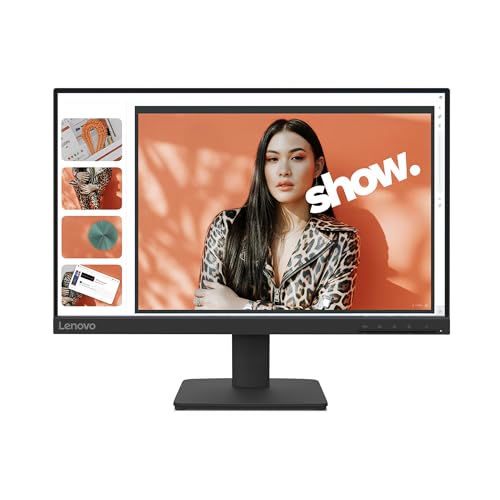
The L22-4e makes a strong first impression by focusing on clarity and comfort rather than flashy extras. Its Full HD IPS panel delivers crisp visuals with consistent color from nearly any angle, which works well for multitasking, streaming, or collaborative work. With 99% sRGB coverage and a 1300:1 contrast ratio, images and videos appear clean and well-defined, staying true to their original tones.
For day-to-day use, the smoother 100Hz refresh rate adds a noticeable boost, making scrolling and transitions look more fluid than on standard 60Hz displays. The 4ms response time also keeps motion under control, whether you’re watching videos or doing light gaming. Eye comfort is another area Lenovo clearly prioritized. The built-in low blue light technology helps reduce eye strain during long sessions without distorting colors, which we found especially useful for extended workdays.
The design stays practical. A three-sided borderless frame gives the monitor a modern edge, while VESA mount support allows for flexible desk setups. The included stand is easy to assemble and offers basic tilt adjustment. However, it stops there, so users looking for height or swivel adjustments may need a monitor arm instead.

Rich VA panel with 3000:1 contrast Smooth 100Hz refresh rate Thin bezels for a modern look TÜV certified for reduced eye strain
The VA panel can show minor ghosting in fast-moving scenes
The SE2225HM makes a compelling case as a daily driver for mixed use. Its VA panel is the star, delivering deep blacks and a strong 3000:1 contrast ratio that gives movies and games a more dimensional, rich look compared to standard office panels. The 100Hz refresh rate is a welcome step up from the typical 60Hz, making everyday scrolling and on-screen motion feel noticeably smoother and more responsive. Designed for comfort, its thin bezels maximize the screen real estate for a more modern look, while the TÜV Rheinland certification for eye care is a thoughtful addition for long sessions. The included tilt adjustment and simple HDMI/VGA connectivity round out a straightforward, user-friendly package.
The technology that provides those rich contrasts and deep blacks comes with a characteristic trade-off in pixel response. The VA panel may show slight ghosting or smearing in scenarios that move very quickly and have a lot of contrast, like when a dark object moves quickly across a bright background in a game. But it doesn't change how well it works overall, so you don't have to worry too much about it.

Crisp Full HD IPS visuals Fast 1ms response time AMD FreeSync support Eye-friendly VisionCare features
No built-in speakers
Instead of trying to be everything at once, the AOPEN 22SA2Q concentrates on delivering smooth visuals in a clean, minimal package. The Full HD 1920 x 1080 resolution keeps images sharp and detailed, while the IPS panel ensures colors remain natural and consistent across wide viewing angles. This makes it suitable for streaming, browsing, and general productivity, especially in smaller workspaces.
Motion handling is one of the monitor’s stronger points. With a rapid 1ms TVR response time, fast-moving scenes stay clear, helping reduce smearing during action-heavy gameplay or quick transitions. AMD FreeSync support further improves the experience by synchronizing the display with your graphics card, resulting in tear-free visuals and smoother frame delivery during games.
Comfort hasn’t been overlooked either. AOPEN’s VisionCare technologies focus on reducing eye strain, which comes in handy during long study sessions or extended viewing. The ultra-thin design also adds to its appeal, giving it a modern look that fits neatly into home setups. One thing to note is audio. Since speakers are not built in, external speakers or headphones are required. That small trade-off keeps the design simple while leaving users free to choose their preferred audio setup.
Factors Related To best 21 inch monitor You Should Focus On For The Most Efficient Purchase
best 21 inch monitor will be discussed in-depth, and all of its characteristics will be closely investigated so you can determine whether or not it is ideal for your needs. It will save you time and effort since our guide to the best can assist you as much as possible.
Please read the following guide for easier select best 21 inch monitor in 2026:
Aspect Ratio
Screen Size
Response Time
Panel Type
Connections
Refresh Rate
Resolution
Brightness
FAQs
Is a 21 inch monitor good for everyday use?
Yes, a 21 inch monitor is well-suited for daily tasks like browsing, office work, and watching videos, especially in smaller or space-limited setups.
What resolution is best for a 21 inch monitor?
Full HD (1920 × 1080) is the most common and effective resolution for a 21 inch monitor, providing sharp visuals without excessive scaling.
Are 21 inch monitors good for gaming?
They can work well for casual gaming. Models with higher refresh rates and low response times offer smoother gameplay within this size range.
Conclusion
The considerations outlined in this blog post should demonstrate that best 21 inch monitor is worth the money and then some. If you want a different model but still want performance, the long-lasting investment which provides you with years of enjoyment, you have no choice but to check AOPEN 22SA2Q 21.5" Monitor that is available.
About Michael Brown