The 7 Best 24 Inch Curved Samsung Monitor For 2025
 By, Michael Brown
Updated
Summary

Samsung 24" S36GD Curved Monitor
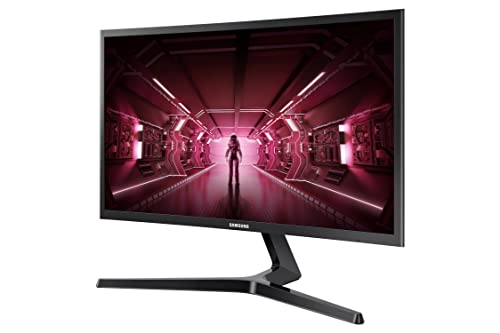
SAMSUNG 24-Inch CRG5 Curved Monitor
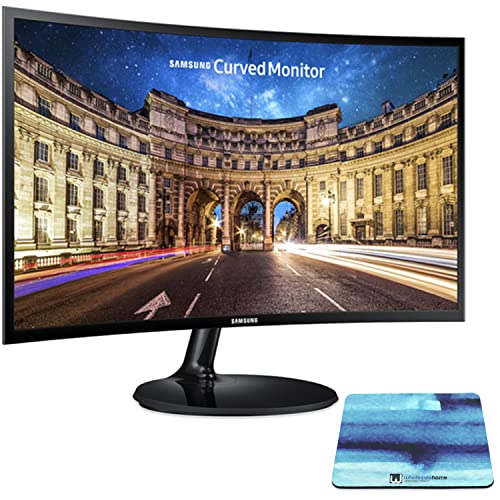
SAMSUNG 24 Inch Curved Monitor
If you’re searching for the Best 24-Inch Curved Samsung Monitor, you’re in the perfect place. A 24-inch curved display is one of the most versatile options available today. It’s compact enough to fit neatly on any desk, while still offering a cinematic, immersive feel that flat monitors simply can’t match. Whether you’re into fast-paced gaming, binge-watching your favorite shows, or tackling productivity tasks, a curved Samsung monitor can deliver sharper details, smoother visuals, and a more comfortable viewing angle.
Samsung has built a strong reputation for innovation in display technology, and its curved monitors are no exception. From fast refresh rates that give gamers a competitive edge to eye care technologies that reduce strain during long working hours, Samsung combines style and performance in a way few brands can. Plus, their sleek, modern designs blend seamlessly into any setup whether it’s for a home office, study space, or gaming corner.
In this buying guide, we’ll walk you through the best 24-inch curved Samsung monitors available, breaking down their standout features and helping you decide which model best fits your needs. And if you prefer something bigger or smaller, we also highlight other curved Samsung monitors in different sizes, so you can find the perfect match.
Our Top Picks


Compact and immersive curve Smooth 100Hz refresh rate TÜV-certified eye comfort tech Flexible device connectivity
No built-in speakers
Samsung’s 24" S36GD Curved Monitor brings immersion into a compact size that fits neatly on most desks. The curved design naturally wraps around your field of vision, creating a sense of depth that draws you into the screen while minimizing distractions at the edges. For anyone who enjoys fast-moving games or videos, the 100Hz refresh rate helps keep everything smooth, reducing blur and lag so action scenes feel more fluid.
Gamers in particular will appreciate Game Mode, which enhances colors and contrast to reveal hidden details in darker areas, giving you that extra edge during competitive play. Outside of gaming, the monitor is just as comfortable for long work sessions, thanks to TÜV-certified eye care technology that reduces flicker and blue light exposure. This thoughtful balance makes it equally suitable for productivity, entertainment, and casual gaming.
This monitor also offers flexible connectivity, allowing you to plug in multiple devices with ease. However, it doesn't have built-in speakers, which means you’ll need external audio for sound. But the S36GD still remains an appealing choice for those seeking a well-rounded display.

Fast 144Hz refresh rate AMD FreeSync support Immersive 1800R curved design High 3000:1 contrast ratio
Stand can feel wobbly
The 24-Inch CRG5 Curved Monitor shows that even a smaller display can pack a punch when it comes to gaming. Its 1800R curvature creates a subtle wraparound effect that draws you in, making everything from shooters to racing games feel more engaging. The 144Hz refresh rate is the best part of this. Gameplay is always smooth, even when things are moving quickly and every millisecond counts. AMD Radeon FreeSync cuts down on stutters and screen tearing, which keeps the visuals smooth and the gameplay snappy.
The monitor also features a 3000:1 contrast ratio with a VA panel, which helps highlight details in darker scenes. That means spotting hidden enemies in shadowy corners becomes easier, giving you a slight edge in competitive moments. Eye Saver Mode further supports extended gaming or work sessions by reducing strain from blue light exposure.
One minor drawback is that the stand can feel a little wobbly at times. While this doesn’t affect performance, it’s something to keep in mind if you tend to adjust your monitor often. Overall, the CRG5 offers a great balance of speed and comfort for gamers on smaller desks.

Immersive 1800R curved screen Crisp Full HD resolution Eye Saver Mode comfort Sleek ultra-slim profile
Instructions could be better
Samsung’s 24-Inch Curved Monitor is proof that even smaller screens can deliver a big impact. Its 1800R curvature gently wraps around your vision, creating a sense of depth that makes both work and entertainment more engaging. Whether you’re browsing, editing documents, or streaming shows, the curved design helps reduce eye strain by mimicking the natural shape of the human eye. Pair that with Eye Saver Mode, which cuts down blue light and flicker at the push of a button, and you get a monitor built with comfort in mind.
The visuals are crisp and clear with a 1920 x 1080 Full HD resolution and a 3000:1 contrast ratio that highlights vivid colors and finer details. The ultra-slim screen is less than half an inch thick, which adds a modern, minimalist touch to your setup. A tilt adjustment range from -2 to 22° adds flexibility for different viewing angles, while the included mouse pad makes it an even more practical package.
The only drawback is that the instructions could be clearer, which might make the initial setup slightly confusing. Still, once it’s up and running, the smooth visuals, comfortable curve, and stylish design more than make up for it.
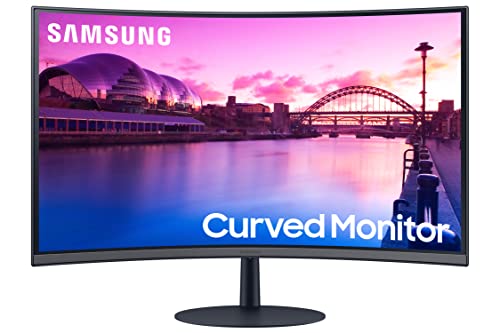
Immersive 1000R curved screen Advanced eye comfort features Smooth 75Hz with FreeSync Built-in speakers and HDMI x2
No HDR support
Samsung’s 27-Inch S39C Curved Monitor feels like it was designed to draw you in and keep you comfortable while you work or play. Its 1000R curve matches the human field of view to create a more natural perspective. Not only does this make games and movies feel immersive, but it also helps reduce eye fatigue—something even backed by a clinical study. Pair that with Flicker Free technology and Eye Saver Mode, and it’s clear this monitor puts comfort first.
AMD FreeSync and a 75Hz refresh rate make the images fluid and responsive, which helps cut down on tearing while gaming. Game Mode tweaks the settings even further, making the action look more lifelike and colourful. It's just as fun to use every day because it has two HDMI and DP connections that make it easy to connect different devices. Built-in 5W speakers make things easier, so you don't need any extra accessories to watch shows or play games.
While the monitor doesn’t support HDR, its sharp curve, smooth performance, and stylish design still make it a compelling option for entertainment, gaming, and productivity.

Sharp QHD high-resolution detail Smooth 165Hz refresh rate 1ms response time for clarity Immersive 1000R curved design
Only includes a DisplayPort cable
If Samsung’s smaller curved monitors, like the 24" models, are built for everyday comfort and compact setups, the Odyssey G55C is what happens when you take that foundation and crank up the power for serious gaming. Its QHD resolution offers 1.7 times the pixel density of Full HD, meaning sharper images, finer details, and more screen space to dive into expansive game worlds. Compared to the simpler 24" S36GD or S24C, this one feels like stepping from a cozy workspace into a full-scale battlefield.
The 1000R curve adds another level of immersion, wrapping the action tightly around your field of view. For fast-paced gameplay, the 165Hz refresh rate and 1ms response time move feel razor sharp, eliminating lag and blur. FreeSync keeps visuals fluid, while HDR10 unlocks deep blacks and luminous highlights that reveal details often missed on lower-tier monitors.
Comfort hasn’t been forgotten—Eye Saver Mode and flicker-free tech let you stay locked in during long gaming sessions without strain. Nevertheless, it only has a DisplayPort cable, which may require some users to pick up an extra HDMI cable. Still, for anyone upgrading from entry-level curved displays, the G55C feels like a leap into next-level gaming immersion.

Massive 49" Dual QHD display Ultra-fast 240Hz refresh rate HDR with 1000 nit brightness CoreSync immersive lighting
A bit expensive
If the Odyssey G55C feels like stepping into serious gaming, the G95C is what happens when you take immersion to its absolute extreme. Its 49-inch Dual QHD display is like having two QHD monitors next to each other, but without the bezels getting in the way. The 1000R curve pushes the edges into your peripheral view, making it feel like you're completely surrounded, whether you're flying through open-world adventures or racing at high speeds.
Performance is just as jaw-dropping as the size. With a 240Hz refresh rate and a 1ms response time, it delivers buttery-smooth gameplay and blur-free frames even in the fastest action scenes. HDR performance is equally impressive, with 1000 nit peak brightness and a million-to-one contrast ratio that highlights subtle shadows and dazzling highlights in a way smaller monitors simply can’t match. Compared to the G55C, the difference feels like moving from great immersion to a cinematic, wraparound reality.
Style and usability are part of the package, too. CoreSync lighting projects game colors into your environment for added atmosphere, while the ergonomic Hexa stand and VESA compatibility make positioning effortless. The only catch is the price, it’s certainly an investment. But for gamers who want the most commanding, cinematic experience possible, the G95C earns its place as the ultimate upgrade.

100Hz refresh rate and curved panel Built-in speakers Ultra WQHD ultrawide panel Easy to Set Up
Not very suited for professionals in photo/video editing
The SAMSUNG S39GD Curved Monitor is designed for users who want immersion without the extras weighing them down. With its 100Hz refresh rate and curved panel, it delivers smooth, engaging visuals whether you’re gaming, streaming, or working on light creative projects. Built-in speakers add a layer of convenience, freeing up desk space and making it a clean all-in-one solution for casual setups.
Compared to the Viewfinity S65UA, which shines as a productivity powerhouse with its Ultra WQHD ultrawide panel and USB-C connectivity, the S39GD feels more like an entry-level option. Nonetheless, the FHD resolution and basic color range are more aligned with general use than professional editing. Where the S65UA spreads out your multitasking canvas, the S39GD keeps things simple, sticking to the essentials.
That said, the S39GD’s strength lies in accessibility. It’s less demanding on space, easier to set up, and offers a more budget-friendly way to enjoy smooth performance and immersive visuals. For someone who prioritizes straightforward entertainment and everyday work, it’s a practical, no-frills choice.
What to Look For in a best 24 inch curved samsung monitor?
Often buyers are reluctant to buy best 24 inch curved samsung monitor. When considering a large purchase, certain things should be examined. Our knowledge and experience of best 24 inch curved samsung monitor will help in making the best options.
Please keep in mind the following criterial before selecting the best 24 inch curved samsung monitor:
Connections
Aspect Ratio
Refresh Rate
Screen Size
Panel Type
Brightness
Response Time
Resolution
FAQs
Is a 24-inch curved Samsung monitor good for gaming?
Yes, many 24-inch curved Samsung monitors come with high refresh rates, low response times, and FreeSync technology, making them excellent for smooth and immersive gaming.
Can I use a 24-inch curved Samsung monitor for work or studying?
Absolutely. The curved design reduces eye strain and makes multitasking easier, while features like Eye Saver Mode and Flicker-Free technology provide comfort during long hours.
Does Samsung offer other curved monitor sizes besides 24 inches?
Yes, Samsung has curved monitors in multiple sizes, from compact 24-inch models to larger 27-inch, 32-inch, and even ultra-wide options to suit different needs.
When new data becomes available, we routinely adjust the list of best 24 inch curved samsung monitor. Please do regularly visit our website for the most up-to-date news.
If you have any questions or difficulties with best 24 inch curved samsung monitor, please do not hesitate to contact us. We'll try our best to do everything we can to assist you if you ask!
About Michael Brown