The Best Laptop For Ui Ux Designer Of 2026
 By, Michael Brown
Updated
Summary

Apple 2024 MacBook Pro M4

Acer Swift Go Intel Evo 14"

Dell 15.6 Laptop
UI/UX design sits in an interesting middle ground when it comes to laptop requirements. You may not need the extreme processing power demanded by 3D rendering or professional video production, but you do need a machine that stays responsive while Figma, Adobe apps, dozens of browser tabs, and communication tools are all running at once. Just as importantly, the screen needs to show your work accurately.
For designers, display quality deserves as much attention as the processor. Good color reproduction, sharp resolution, comfortable brightness, and enough screen space can make long design sessions considerably easier. Portability and battery life matter too, particularly if your work regularly moves between home, the office, client meetings, and coffee shops.
That combination is where the Apple 2024 MacBook Pro M4 makes a strong case for itself. It packs plenty of performance into a remarkably thin and lightweight body, while its Liquid Retina display is well suited to interface design, prototyping, and other visually demanding work.
Of course, the UI/UX workflow is not identical for everyone. A designer working primarily in Figma may value portability above everything else, while someone handling heavier Adobe workloads might prefer more memory or a larger display. We've covered those different priorities in our picks, so you can choose a laptop around the way you actually design rather than simply buying the most powerful machine available.
Our Top Picks
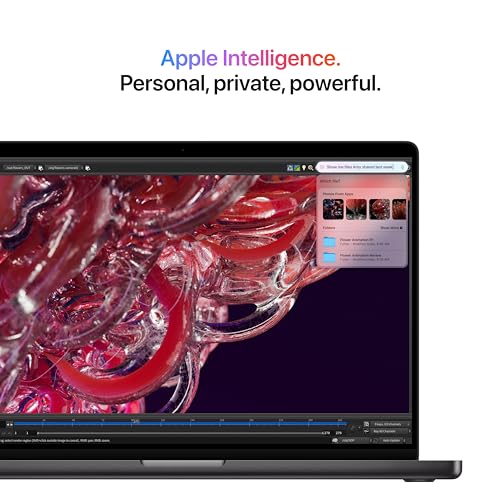

14-inch Liquid Retina XDR display Up to 1600 nits peak brightness All-day battery life Fast support for professional apps
Premium price compared with mainstream laptops
When tiny shifts in contrast or hierarchy can change the character of an interface, the display becomes more than a place to work. The 14-inch MacBook Pro M4 gives visual decisions a striking canvas through its Liquid Retina XDR panel, which reaches up to 1600 nits of peak brightness.
That brightness helps highlights stand out, while the overall display is well suited to examining polished mockups, imagery, and presentation assets. The 14-inch format also finds a useful middle ground: there is enough room for a serious creative workspace, yet the laptop remains practical to carry between home, office, and client sessions.
The M4 chip supplies the speed behind that experience. Apple describes it as capable of moving quickly through everyday activity while multitasking across productivity and professional applications. In practice, that combination makes sense for workflows that jump between design systems, large browser sessions, Adobe Creative Cloud, Microsoft 365, and supporting communication tools.
Performance remains consistent whether the laptop is connected to power or running on battery, which is valuable during long workshops or travel days. Apple Intelligence adds writing and productivity assistance with privacy protections, while macOS gives Apple silicon optimized access to widely used creative software.
The premium price compared with mainstream laptops asks buyers to pay for the stronger display, Apple silicon performance, and more polished portable experience. Designers whose workday revolves around professional creative apps and careful visual review are more likely to appreciate that investment than users with a lighter browser-only workflow.

14-inch 1920 x 1200 IPS touchscreen 13th Gen Intel Core i7 processor 16GB LPDDR5 memory Light 2.76-pound aluminum body 1440p QHD camera
Integrated graphics suit lighter creative workloads best
There is something freeing about carrying a laptop that does not feel like the heaviest item in the bag. At 2.76 pounds and only 0.59 inches thin, the Acer Swift Go 14 is particularly easy to take from a morning workshop to an afternoon critique without leaving the main design machine behind.
The 14-inch 1920 x 1200 IPS touchscreen gives interface work a practical 16:10 canvas. Designs, reference images, and text remain crisp, while touch input makes it natural to scroll through long flows or inspect a prototype directly. Because the laptop is Intel Evo verified, Acer brings performance, faster wireless connectivity, quick charging, and portable endurance together as a coordinated experience.
Under the hood, the 13th Gen Core i7 processor and 16GB of LPDDR5 memory support the kind of multitasking designers do every day. A 512GB PCIe Gen 4 SSD keeps project files and applications responsive, while the microSD reader offers a convenient route for moving visual assets. Wi-Fi 6E and Bluetooth also help keep a workspace less dependent on cables.
Integrated graphics suit lighter creative workloads best, so complex 3D scenes or sustained high-end rendering are not its natural focus. For interface layouts, prototypes, research, and everyday asset preparation, however, the processor, memory, and sharp touch display provide a well-rounded portable foundation.
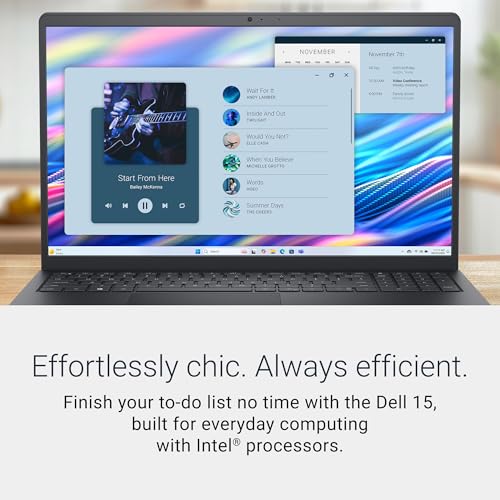
15.6-inch Full HD display Intel Core 3 processor Dell ComfortView software Lifted ergonomic hinge
The display is quite hard to see clearly in bright or outdoor lighting
Not every first design laptop needs to be a high-end creative workstation. For someone learning layout, building early portfolio pieces, or handling straightforward web interfaces, the Dell 15 puts the essentials into a familiar and comfortable package.
Its 15.6-inch Full HD screen gives toolbars, property panels, and browser previews more breathing room than a compact display. Dell ComfortView software also reduces harmful blue light emissions, which can make extended research sessions and repeated rounds of interface refinement easier on the eyes.
An Intel Core 3 processor handles everyday computing, so the laptop is positioned for browser-based design tools, documents, presentations, and routine multitasking. The keyboard receives useful attention too. Roomy keys, a separate numeric keypad, and a calculator hotkey make data-heavy tasks less awkward, while the lifted hinge creates a more natural typing angle for notes and design documentation.
Battery efficiency and ExpressCharge support help keep work moving when an outlet is not immediately available. Dell also includes one year of onsite service, providing added reassurance if a covered hardware problem cannot be resolved remotely.
However, the dim display can be quite hard to see clearly in bright or outdoor lighting. Working indoors or choosing a desk away from direct sunlight should make the screen easier to view, and the Full HD resolution still provides a useful amount of space for entry-level UI and UX projects.

13.6-inch Liquid Retina display Support for one billion colors Up to 18 hours of battery life Supports up to two external displays
Only two Thunderbolt 4 ports
Good design tools should fade into the background once an idea starts taking shape. The MacBook Air M4 gets close to that feeling, giving UI and UX designers a responsive workspace without turning every trip to a café or meeting room into a packing exercise.
At the center is Apple's M4 chip, which is built to keep multiple apps moving fluidly. That matters when a typical workflow includes Figma, a browser full of references, messaging, and perhaps an Adobe app running at the same time. Apple also calls out fast performance for video editing and graphically demanding tasks, so the laptop has room for motion concepts and presentation work beyond static screens.
Visual work benefits from the 13.6-inch Liquid Retina display. Support for one billion colors helps gradients, illustrations, and interface states appear rich and nuanced, while crisp text makes dense wireframes and design documentation comfortable to inspect. The portable chassis and up to 18 hours of battery life then let that workspace travel easily without sacrificing performance away from an outlet.
Calls and critiques are covered by a 12MP Center Stage camera, three microphones, and a four-speaker system with Spatial Audio. Meanwhile, Wi-Fi 6E and Bluetooth 5.3 handle wireless accessories, and support for two external displays makes it possible to build a broader desk setup later.
Only two Thunderbolt 4 ports means a designer with several wired accessories may occasionally want a compact hub. MagSafe keeps charging separate, though, and the headphone jack provides one more direct connection, so the streamlined port selection remains manageable for a mobile setup.

15.6-inch 3K OLED display 120Hz refresh rate 100% DCI-P3 color gamut 16GB LPDDR5X RAM
Some specialized apps may need ARM-compatible versions
A polished interface deserves a screen that makes its color, spacing, and motion easy to judge. The Vivobook S 15 answers with a 15.6-inch 3K ASUS Lumina OLED display, giving designers a large, detailed surface without turning the laptop into a bulky workstation.
The 2880 x 1620 resolution helps fine text and interface elements appear crisp, while 100% DCI-P3 coverage provides a broad color range for visual exploration. A 120Hz refresh rate and 0.2ms response time make scrolling, animated prototypes, and transitions look especially fluid. High peak brightness also helps the image retain energy across different indoor environments.
Performance comes from the Snapdragon X Elite 12-core processor, supported by a Qualcomm AI Engine rated at up to 45 TOPS. The Adreno GPU handles graphics, while 16GB of LPDDR5X memory keeps several applications available during a busy project. A 1TB SSD offers generous room for design files, research captures, exported presentations, and supporting media.
Despite the larger screen, the laptop measures only 0.63 inches thin and weighs 3.13 pounds. That balance is useful for designers who want more canvas at the office but still expect to carry the computer regularly. Windows 11 and Copilot+ features add a familiar workspace with on-device AI support.
Some specialized apps may need ARM-compatible versions, so checking critical plugins or older desktop software before moving an established workflow is worthwhile. Browser-based tools and software optimized for Snapdragon can take fuller advantage of the laptop's efficient, portable design.

Compact 14-inch design Microsoft Copilot One year of Microsoft 365 Bonus docking station set
Windows 11 S may require switching modes for some design applications
Beginning UI and UX work often involves more learning, note-taking, and browser research than heavy production. The HP Stream 14 is shaped around that stage, offering a compact computer for exploring design principles, organizing ideas, and building simpler prototypes.
Its 14-inch HD display keeps the body manageable for classes or shared workspaces. The Intel N150 processor is intended for everyday responsiveness, while 16GB of DDR4 memory provides welcome breathing room when several browser tabs, documents, and communication tools are open together.
Storage is assembled from 128GB of internal space, a 256GB docking station, and a 32GB microSD card with adapter. That bundle provides different places for project files and course materials, and the included dock expands the setup further. Connectivity covers USB-C, two USB-A ports, HDMI 1.4b, a media card reader, Wi-Fi 6, Bluetooth, and a headset connection.
Microsoft Copilot can help with early ideation and written tasks, while the included year of Microsoft 365 supports briefs, research notes, and presentations. HP Fast Charge reaches approximately 50% in 45 minutes, and the 3.24-pound body remains comfortable enough for regular transport.
Windows 11 S may require switching modes for some design applications. That extra setup step is worth considering before installing desktop creative software, although students using browser-based design platforms can begin working with fewer changes.

16-inch 3K AMOLED touchscreen 120Hz refresh rate Included S Pen 32GB RAM and 1TB storage
Shallow Keyboard
Some ideas arrive more naturally through a pen than a trackpad. The Galaxy Book5 Pro 360 makes room for that process with a convertible touchscreen and included S Pen, allowing a designer to sketch, annotate, and fine-tune a concept directly on the display.
The 16-inch 3K AMOLED touchscreen provides a generous visual workspace, while the 120Hz refresh rate keeps pen movement, scrolling, and prototype transitions feeling smooth. Enhanced tilt sensitivity makes writing and drawing feel more natural, and multi-touch gestures offer another direct way to navigate detailed projects. Anti-reflective Gorilla Glass with adaptive brightness also helps content remain crisp in brighter surroundings.
An Intel Core Ultra 7 processor combines with Intel Arc graphics and an NPU reaching as high as 47 TOPS for Copilot+ AI. With 32GB of memory and a 1TB drive in this configuration, the laptop has ample room for complex multitasking and a substantial design library. A dedicated AI key provides quick access to Copilot for writing, image generation, and research assistance.
Samsung's connected features add a different kind of convenience. Multi Control lets the keyboard and touchpad navigate compatible Galaxy devices, TVs, and monitors, while Phone Link brings calls and messages onto the laptop. Transcript Assist can turn recorded meetings into notes, translations, and summaries, which is useful after interviews or stakeholder sessions.
The shallow keyboard offers less key travel than some designers may prefer during long writing sessions. Despite this, the responsive touchscreen and S Pen provide alternative ways to interact with creative work, while the slim 3.72-pound CNC aluminum body keeps this large convertible surprisingly portable.
What Does Our Expert Advice You To Consider For Selecting best laptop for ui ux designer?
best laptop for ui ux designer is chosen based on a number of parameters. Depending on the product category, the learning process differs. And so, we're here to consult, guide, and address your product-related problems.
Please keep in mind the following points before selecting best laptop for ui ux designer:
Operating System
CPUs
Two companies make laptop processors, Intel and AMD.
Hard Drive
If you have the funds, consider an SSD drive. It should be at least 256 gigabytes. SSDs perform faster than older standards like SATA, particularly if you use NVMe. This allows data to be transferred from the drive quickly.
RAM
For the most part, 8 gigabytes should suffice for Windows users. However upgrading to 16GB will increase your computer's performance and be a requirement for gamers. Before you purchase RAM, make sure it is properly soldered to your motherboard. It is impossible to replace the RAM if it has been soldered.
FAQs
What makes a laptop good for UI UX design?
A good UI UX laptop should have a high-quality display, capable processor, at least 16GB of RAM, fast SSD storage, and comfortable portability.
Is a 4K display necessary for UI UX design?
Not necessarily. A sharp Full HD or 1440p display can work well, while 4K is useful for designers who prioritize extra detail and screen space.
Can a MacBook be used for UI UX design?
Yes. MacBooks are popular among designers because of their high-quality displays, strong performance, long battery life, and support for major design applications.
Because we are product consulting professionals with much expertise, we believe the data is credible. Aside from that, the best laptop for ui ux designer data is kept up to date, and you may feel confident that the information is up to date and correct.
We can help you in addition to best laptop for ui ux designer. If you want to support, please don't hesitate to contact us. Thanks for reading!
About Michael Brown