The Best Hp Monitor For Home Office Of 2026
 By, Michael Brown
Updated
Summary

HP Series 3 27 inch FHD Monitor

HP Series 5 27 inch FHD Monitor
HP 27h Full HD Monitor
Setting up a home office means making choices that affect your comfort, productivity, and focus every single day. And few decisions matter more than the screen you'll be staring at for hours. An HP monitor brings something special to that equation: reliability you can count on, thoughtful features designed for real work, and a reputation built over decades of serving both corporate offices and home workspaces.
The right monitor for your home office should disappear into your workflow, not fight it. You need crisp text that stays sharp during long reading sessions, a stand that positions the screen exactly where your neck wants it, and connections that make swapping between your work laptop and personal computer effortless. Some models even pack built-in speakers to clear desk clutter or USB-C ports that charge your device while displaying your content through a single cable.
Among the current lineup, the HP Series 3 27 inch FHD Monitor is a premium choice. The 27-inch IPS display delivers crisp, vibrant visuals with wide viewing angles, so colors stay true whether you're staring straight ahead or leaning back to think.
Our research digs into what truly matters for your daily workflow. We've analyzed professional reviews, user experiences, and real-world performance to identify the HP monitors that deliver the clarity, comfort, and connectivity your home office deserves. Let us help you find the screen that makes work feel less like work.
Our Top Picks


Large 27-inch clear FHD display Smooth and responsive 100Hz refresh Wide viewing angles with IPS Slim borderless modern design
250-nit brightness may struggle in very bright rooms
A larger screen can quietly change how your desk feels, and this 27-inch display does exactly that. Once it’s set up, the wide panel gives you plenty of room for documents, videos, and browser tabs without feeling cramped. The Full HD resolution keeps images crisp, while the 1300:1 contrast ratio helps bring out small differences between shadows and highlights, which makes everyday content look more defined.
Scrolling through pages or moving between windows feels smoother than expected thanks to the 100Hz refresh rate. Motion looks more fluid, which can make a difference whether you're working quickly or watching a video during a break. IPS technology also plays a helpful role here. Even when you’re slightly off to the side, the colors remain consistent instead of fading or shifting.
Connectivity is straightforward with HDMI, DisplayPort, and VGA options, so plugging it into different devices rarely becomes a hassle. The ergonomic adjustment guide in the HP Display Center is another thoughtful touch, helping you position the monitor comfortably throughout the day. Brightness reaches 250 nits, which works well for most indoor spaces. In very bright rooms, however, the screen may need a little help from adjusted lighting to stay at its clearest.

Sharp 27-inch Full HD display Smooth and fluid 100Hz refresh Accurate color with 99% sRGB Bright 300-nit clear visibility
No VESA mount support available
At first glance, the design sets a calm and tidy tone for the workspace. This monitor has a thin, lightweight build that doesn’t dominate the desk, and the clean frame makes it easy to pair with another screen if you want a wider setup. Integrated cable containment also helps keep wires from turning into a messy cluster behind the monitor.
Once the display lights up, the 27-inch panel gives you plenty of room to work comfortably. The Full HD resolution keeps text and images looking sharp, while the enhanced 1500:1 contrast ratio adds a bit more depth between darker and brighter areas. That extra contrast helps small details stand out when reading documents, editing images, or watching videos.
Color reproduction is another strong point here. With 99% sRGB coverage and IPS technology, colors stay consistent across wide viewing angles, so the picture looks reliable even when viewed from the side. The 300-nit brightness also helps maintain clear visibility in most indoor lighting conditions. Motion appears smooth thanks to the 100Hz refresh rate, making scrolling and quick movements look more fluid than standard displays. The only small drawback is that it has no VESA mounting support. Even so, the sleek stand and compact design still make it easy to place the monitor comfortably on most desks.

Large 27-inch clear display Smooth 75Hz everyday performance Adjustable height and tilt stand Built-in dual speakers included
No USB hub or advanced connectivity options
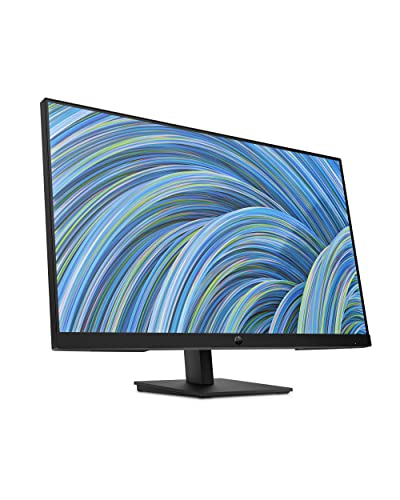
Some monitors quietly do their job without demanding much attention, and the HP 27h fits nicely into that category. The 27-inch screen provides a comfortable amount of space for spreadsheets, documents, or a few browser tabs side by side. With Full HD resolution and an IPS panel, text appears sharp and colors remain consistent even when viewed from slightly different angles.
Motion feels reasonably smooth as well. The 75Hz refresh rate gives scrolling and on-screen movement a softer, more fluid feel compared to standard displays. During video calls or quick content breaks, the built-in dual speakers add a bit of convenience, letting you hear clearly without needing extra desktop speakers.
Adjusting the monitor is also simple. The stand supports both height and tilt adjustments, making it easier to position the screen at a comfortable viewing level during long work sessions. Navigation through settings is handled with an intuitive joypad control, and additional adjustments can be made through the HP Display Center. Connection options cover the basics with HDMI, DisplayPort, and VGA, so linking up a laptop or desktop is straightforward. It doesn’t include a USB hub or more advanced connectivity features, but for everyday work tasks, the available ports still handle most setups without trouble.

Clear IPS display Comfortable low blue light filter Bright 300-nit anti-glare screen Slim borderless dual-screen friendly
Built-in speakers are functional but not immersive
A larger display can make even simple tasks feel easier, and this 27-inch screen offers plenty of space to spread things out. Documents, videos, and multiple browser tabs all fit comfortably without feeling crowded. The Full HD resolution keeps details sharp, while the IPS panel helps maintain accurate colors even when you’re viewing the screen from the side.
Brightness reaches up to 300 nits, which keeps the picture clear in most indoor lighting conditions. Anti glare and flicker free technology also help reduce distractions during longer sessions, and the low blue light filter works quietly in the background to keep your eyes more comfortable throughout the day.
A thin, lightweight frame with a three sided borderless look makes the monitor feel open and uncluttered, and it pairs nicely with a second screen if you need more workspace. The tilt adjustment allows you to angle the screen from -5 to +25 degrees, and HP’s ergonomic setup guide provides helpful suggestions for positioning. The built in speakers handle everyday audio tasks, although they focus more on convenience than delivering a truly immersive sound experience.

Accurate 99% sRGB color display Comfortable 4-way ergonomic adjustments Eye-care features reduce strain Wide viewing angles with IPS
HDR support is not included
Some workdays involve hours of staring at a screen, so comfort quickly becomes just as important as picture quality. The HP E24 G5 approaches this by combining clear visuals with a setup that adapts easily to your workspace. The 23.8-inch Full HD display keeps text and images sharp, while the 99% sRGB color coverage adds a natural level of vibrancy that helps graphics and videos look more balanced.
IPS technology keeps the picture consistent even when viewed from different angles, which can be helpful during collaborative work or when shifting positions at your desk. Movement on screen remains smooth as well, thanks to the 75Hz refresh rate that makes scrolling and everyday tasks appear more fluid.
Where the monitor really focuses its attention is on long-term comfort. The stand offers 4-way adjustability, allowing you to raise, lower, tilt, or swivel the screen to find a comfortable position. HP Eye Ease, an always-on low blue light filter, works alongside flicker-free technology to help reduce eye strain during long sessions. Nevertheless, the HDR support is not included here. Though for everyday productivity and general viewing, the display still delivers clear and reliable visuals.

Accurate 99% sRGB color reproduction Strong metal build quality Flexible ergonomic adjustments available Includes dock and desk mount
A bit pricey compared to basics
A monitor often becomes the center of a workspace, and the HP EliteDisplay E27 G5 feels built with that idea in mind. Its 27-inch display provides plenty of room to work comfortably, whether you’re reviewing documents, organizing multiple windows, or handling detailed visual tasks. The Full HD resolution keeps everything crisp, while the 99% sRGB color coverage helps images and graphics appear vibrant and accurate.
Viewing angles remain consistent thanks to the IPS panel, so the picture stays stable even when you shift your seating position. A 75Hz refresh rate keeps motion smooth for everyday tasks, and HP Eye Ease works quietly in the background with a built-in low blue light filter and flicker free technology to help reduce eye fatigue during long work sessions.
The physical design also plays a big role in its appeal. The metal construction gives it a solid feel, while the edge to edge look adds a clean and professional appearance to the desk. Ergonomic adjustments such as height control, pivot rotation, and VESA mount compatibility allow the monitor to adapt easily to different setups. This bundle also includes a Multiport G5 HP dock and a dual monitor desk mount, which can simplify connectivity and expand workspace flexibility. The price can be a bit higher than basic monitors, but the additional features and included accessories help justify the investment for many professional setups.

Clear 21.5-inch Full HD display Accurate 99% sRGB colors Comfortable four-way ergonomic adjustments Compact design with micro-edge bezel
Not ideal for gaming performance
A smaller monitor can sometimes be exactly what a workspace needs, especially when desk space is limited. The HP E22 G5 keeps things compact while still delivering a clear and comfortable viewing experience. Its 21.5-inch Full HD display presents sharp text and detailed images, and the 99% sRGB color range helps give visuals a balanced and natural appearance.
Thanks to IPS technology, the screen remains consistent from different angles, which can be helpful during meetings or when you shift positions while working. Everyday tasks also benefit from the 75Hz refresh rate, adding a bit of smoothness when scrolling through documents or navigating between windows.
The design adds another practical touch. A three-sided micro-edge bezel gives the display a clean look while leaving more usable screen space. Connectivity is simple and accessible, and the intuitive joypad control makes adjusting settings straightforward. While it isn’t designed with gaming in mind, it performs very well for daily productivity, web browsing, and general office use.
Which Characteristics To Consider On Selecting best hp monitor for home office For 2026?
To make a practical purchase, you guys need to be aware of best hp monitor for home office ultimately. Several key factors must be taken into account and evaluated. Of course, there are some challenges for you during the process of studying products. So we are available here to provide you with comprehensive advice and support.
Thanks to the evaluation supported by high technology, we have come up with some significant features for you to go through. Let’s check it below!
Panel Type
Aspect Ratio
Response Time
Refresh Rate
Screen Size
Resolution
Connections
Brightness
FAQs
What size HP monitor is best for a home office?
A 24-inch or 27-inch HP monitor is ideal for most home office setups. These sizes provide enough screen space for multitasking while still fitting comfortably on a typical desk.
Are HP monitors good for productivity?
Yes, HP monitors are known for their reliable performance, clear displays, and ergonomic designs, making them a strong choice for productivity, remote work, and everyday office tasks.
Do HP monitors have eye-care features?
Many HP monitors include eye-care technologies such as low blue light mode and flicker-free screens to help reduce eye strain during long work sessions.
About Michael Brown