The 7 Best 34 Inch Curved Monitor For 2025
 By, Michael Brown
Updated
Summary

SANSUI 34-Inch Curved Monitor

Sceptre 34-Inch Curved Monitor

LG 34G630A-B 34-Inch Curved Monitor
A 34-inch curved monitor offers a wide, immersive view that wraps gently around your vision, making every movie, game, or design project feel more vivid and engaging. Unlike standard flat screens, the subtle curvature reduces eye strain and creates a more natural viewing angle, letting you focus comfortably for hours.
But with so many models available, how do you choose the right one? Key factors to consider include screen resolution, refresh rate, and color accuracy. A higher refresh rate ensures smooth motion during fast-paced gaming, while accurate colors make editing photos or videos a true pleasure. Ergonomic features like adjustable stands and eye-care technologies also make a big difference in long-term comfort.
Whether you’re a professional designer, a passionate gamer, or someone who simply wants an upgraded home office experience, the right 34-inch curved monitor can transform your setup. This guide highlights the best options available today, helping you make a confident choice and enjoy visuals that truly come to life.
Our Top Picks
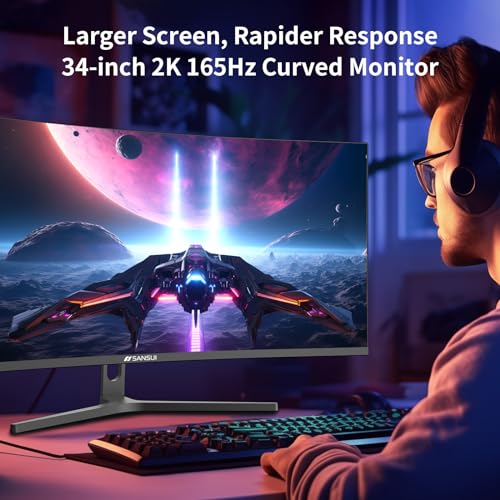

34-inch ultrawide curved screen UWQHD 3440 x 1440 resolution Up to 165Hz refresh rate Ergonomic tilt and PIP/PBP support
Doesn't have built-in speakers
Whether you’re diving into high-speed games or spreading multiple windows across the screen for work, the SANSUI 34-Inch Curved Monitor delivers a compelling experience. Its 1500R curvature paired with UWQHD resolution makes visuals crisp and enveloping, while the VA panel offers deep colors and solid contrast. Smooth motion is handled impressively with refresh rates up to 165Hz and MPRT 1ms response time, keeping fast action clear and ghosting minimal. Adaptive sync via FreeSync reduces screen tearing, which gamers will appreciate.
The ergonomic stand lets you tilt it from -5 ° to 15° and has a Kensington lock for security. Wide 178° viewing angles make sure you can see clearly even if you look from the side, and PIP/PBP compatibility is useful for doing more than one thing at a time. The only downside is that it doesn't have built-in speakers, but the separate headphone output works nicely for private listening. Overall, this monitor offers immersive visuals, responsive performance, and versatile ergonomics.

21:9 ultrawide screen space WQHD 3440 x 1440 resolution 1ms MPRT fast response LED backcover lighting effect
No advanced HDR support
Stepping into the Sceptre 34-Inch Curved Monitor, you immediately notice how expansive the 21:9 ultrawide display feels. Compared to standard monitors, it offers about 30% more screen space, ideal for multitasking or enjoying cinematic gaming. The WQHD resolution at 3440 x 1440 sharpens every detail, making text crisp, graphics rich, and videos lifelike. Fast-paced gaming benefits from the 1ms MPRT response time, which minimizes ghosting and ensures smooth visuals even during intense action scenes.
Furthermore, the luminous backcover lights give the monitor a modern aesthetic that complements any gaming or workspace setup. While it delivers excellent color and clarity, advanced HDR support is missing, so HDR content won’t pop as much as on higher-end monitors. Still, the overall picture quality is impressive and satisfying for most users. Whether you’re tackling multiple apps, streaming, or gaming, this Sceptre monitor blends functionality with style.

21:9 widescreen for extra space 240Hz refresh rate gaming speed 1ms GtG response time USB Type-C connectivity support
Needs a strong GPU for 240Hz
Jumping into the LG 34G630A-B, the first thing that stands out is the 21:9 UltraGear widescreen. It gives extra horizontal space to track game overlays, chat, or guides without breaking immersion. The WQHD resolution brings crisp clarity, while HDR support and up to 95% DCI-P3 color gamut make every scene vibrant, from bright highlights to deep shadows. Fast-paced gaming shines with the 240Hz refresh rate and 1ms GtG response, keeping action smooth and ghosting minimal. FreeSync Premium adds another layer of fluidity, eliminating tearing for competitive gameplay.
The slim bezel design keeps your focus on the screen, and USB Type-C connectivity simplifies setup, allowing video output and data transfer with a single cable. Although getting the full 240Hz experience at WQHD in modern games requires a powerful GPU, the monitor still delivers fluid performance and visually rich gameplay for most setups. In general, this UltraGear monitor delivers speed, color, and immersion seamlessly, making it ideal for competitive gamers who want both performance and style in one package.

Ultra-wide 34-inch curved display Crisp WQHD 3440 x 1440 resolution AMD FreeSync Premium support Wide viewing angle technology
The monitor stand is not adjustable
The Acer Nitro 34-Inch Curved Monitor invites you into an immersive gaming and entertainment experience. Its 34-inch ultra-wide QHD display immediately draws you into whatever you’re doing, whether that’s gaming, streaming movies, or juggling multiple productivity windows. Colors are vivid and lifelike, while the incredible 100,000,000:1 contrast ratio gives images a sense of depth and realism that makes both games and videos feel cinematic. Even fast-moving action is smooth, thanks to the rapid response time and AMD FreeSync Premium technology, which synchronizes the monitor’s refresh rate with your graphics card to eliminate tearing and stutter.
One of the monitor’s quiet strengths is its wide-view angle technology. No matter where you sit or how you share the screen, colors remain accurate and consistent, so friends or family watching alongside you get the same rich visuals. The large, curved display also makes multitasking a pleasure, allowing you to spread multiple applications or browser windows across the screen without feeling cramped.
One minor downside is that the monitor stand isn’t adjustable, so positioning relies on your desk setup. Even so, the Nitro’s stunning visuals and rapid response make it a joy to use day after day.

178° wide-viewing panel 100Hz refresh rate with 1ms MPRT HDMI, DisplayPort, and a USB hub Nano-ion air quality generator
Setup can be quite tricky
Unboxing the ASUS VU34WCIP-W 34-inch Curved Monitor is like stepping into a workspace of the future. The 1500R curved WQHD display immediately wraps your vision, with a 3440x1440 resolution and 178° wide-viewing panel that keeps colors sharp and consistent from nearly any angle. Daily use, whether for work or entertainment, benefits from SmoothMotion technology, which combines a 100Hz refresh rate and 1ms MPRT to eliminate ghosting and deliver crisp, fluid visuals.
The built-in Nano-ion generator quietly enhances air quality while you work or game, adding a unique wellness element to your setup. The USB-C port is a true multitasker, handling video, data, and even 65W laptop charging through a single cable. There are more connectors, such as HDMI, DisplayPort, and a USB hub, that make it easy to connect more than one device. This monitor also helps you sit up straight by letting you choose from three heights. It also comes with useful extras like a phone holder and a laptop stand that you can use again and again. People who care about the environment will like the energy-efficient design and eco-friendly packaging.
Nevertheless, the setup can be a bit tricky and may require patience to get everything aligned perfectly. Once assembled, though, the ASUS VU34WCIP-W proves itself as a versatile and wellness-focused ultrawide monitor.

1500R curve 180Hz refresh rate and 1ms response Vibrant colors with HDR support Low blue light for marathon sessions
A bit heavy
When you go close to the Alienware AW3425DWM, you can tell right away that this isn't just a gaming monitor. The 34-inch ultrawide screen with a 1500R curve creates a wraparound effect that pulls you straight into your games. WQHD resolution ensures that every detail, from distant terrain to intricate textures, is sharp and immersive. Coupled with 95% DCI-P3 color coverage and VESA DisplayHDR 400 certification, the visuals are vibrant and cinematic, making both games and movies pop like never before.
Gameplay is impressively fluid. The 180Hz refresh rate combined with a 1ms gray-to-gray response time keeps fast-paced action smooth and responsive. AMD FreeSync Premium and VESA Adaptive Sync eliminate tearing and stutter, letting you focus on strategy instead of visual hiccups. For longer gaming sessions, the dedicated console mode and low blue light solution reduce eye strain while preserving color accuracy, keeping you comfortable even during marathon play.
The monitor’s size and weight are significant, so you’ll need a spacious desk to accommodate it. Despite this, the AW3425DWM delivers a commanding presence and a fully immersive gaming experience.

Ultrawide 3440 x 1440 resolution AMD FreeSync Premium Accurate colors with HDR support Straightforward connectivity
Slightly higher price point
From the moment you power on the Dell S3425DW, it’s clear this monitor was designed with both comfort and performance in mind. The 34-inch curved VA panel immediately draws your eyes across its ultrawide 3440 x 1440 resolution, while HDR readiness and a 3000:1 contrast ratio give images depth and vibrancy. Colors are impressively accurate, with 99% sRGB and 95% DCI-P3 coverage, making everything from detailed work projects to cinematic movies look vivid and lifelike.
The experience is equally smooth on the performance side. With AMD FreeSync Premium, refresh rates up to 120Hz, and an ultra-low 0.03ms response time, motion is fluid and nearly instantaneous, whether you’re gaming, editing, or scrolling through multiple applications. Dell’s ComfortView Plus reduces harmful blue light without sacrificing color accuracy, letting you work or play for hours without eye strain.
Connectivity is also straightforward with a single USB-C cable that handles both video and 65W power delivery, keeping your desk clutter-free. The only minor drawback is the price, which is slightly higher than that of comparable monitors. However, the combination of comfort and stunning visuals makes it a worthwhile investment for those seeking a premium ultrawide experience.
What to Look For in a best 34 inch curved monitor?
The best 34 inch curved monitor is influenced by a multitude of factors, including all those stated below. Depending on the sort of product, the learning process differs. We'll be ready to aid you and propose solutions since we're here to support you.
It's necessary to remember the following factors before selecting best 34 inch curved monitor:
Panel Type
Aspect Ratio
Screen Size
Resolution
Connections
Brightness
Refresh Rate
Response Time
FAQs
What is the advantage of a 34-inch curved monitor over a flat monitor?
A 34-inch curved monitor provides a wider field of view and a more immersive experience. The curve reduces eye strain, enhances depth perception, and makes games, movies, and multitasking feel more engaging.
What resolution should I look for in a 34-inch curved monitor?
For crisp and detailed visuals, aim for at least 3440 x 1440 (UWQHD). Higher resolutions improve clarity for gaming, video editing, and productivity tasks, while ensuring text and images remain sharp across the ultra-wide screen.
Is a high refresh rate important?
Yes. A refresh rate of 100Hz or higher ensures smooth motion during fast-paced games and videos. It also reduces motion blur, providing a better overall experience whether gaming or watching dynamic content.
About Michael Brown