The Best Budget Laptop For Students Of 2026
 By, Michael Brown
Updated
Summary

Apple MacBook Neo A18 Pro

ASUS CX15 15.6" Laptop

Dell 15 Laptop DC15250 15.6-inch
Let us be honest about college life. Tuition is expensive. Textbooks somehow cost more than rent. And between coffee runs and late night food deliveries, the budget gets tighter every semester. A new laptop should not add to that financial stress. It should be one of the few things that actually makes your life easier without breaking the bank.
The good news is that budget laptops have improved dramatically in recent years. You no longer need to sacrifice performance or reliability just because you are watching your spending. A solid budget laptop handles the essentials like writing papers, researching online, streaming lectures, and joining Zoom classes without frustrating lag or constant crashes. The trick is knowing which compromises are worth making and which features you genuinely cannot live without.
Among the options generating serious buzz in the student community, the Apple MacBook Neo A18 Pro enters the conversation as an unexpected but compelling contender in the budget space. It delivers the build quality, ecosystem integration, and impressive battery life that MacBooks are known for, paired with Apple's new A18 Pro chip that handles everyday student tasks with smooth efficiency.
We have dug into reviews, compared specs against real student workflows, and analyzed which budget laptops actually deliver on their promises without hidden compromises. Read on to find the affordable machine that gets you through exams, papers, and everything in between.
Our Top Picks


Strong performance for daily tasks Long-lasting all-day battery life Bright, sharp Retina display Durable and colorful design options
No backlit keyboard
The MacBook Neo A18 Pro keeps things focused on what students actually use day to day. Powered by the A18 Pro chip, it handles common tasks like working through spreadsheets, editing photos, or summarizing notes with AI tools without slowing things down. We found this especially helpful for multitasking between apps during study sessions.
Its 13-inch Liquid Retina display adds to the experience with sharp resolution and vibrant colors, making reading, streaming, or working on assignments comfortable for long periods. The design also leans into portability, with a durable aluminum build and a range of color options that give it a bit more personality than typical student laptops.
Battery life is another strong point. With up to 16 hours, it easily covers a full day of classes without constantly hunting for a charger. The addition of a 1080p camera, dual microphones, and Spatial Audio speakers rounds things out nicely for online classes and group calls. One small detail worth noting is the lack of a backlit keyboard. Still, for students focused on value and everyday performance, this laptop checks the right boxes.
Fast boot and smooth startup Lightweight and durable build design Good battery for daily use Solid memory and storage capacity
Not suitable for heavy workloads
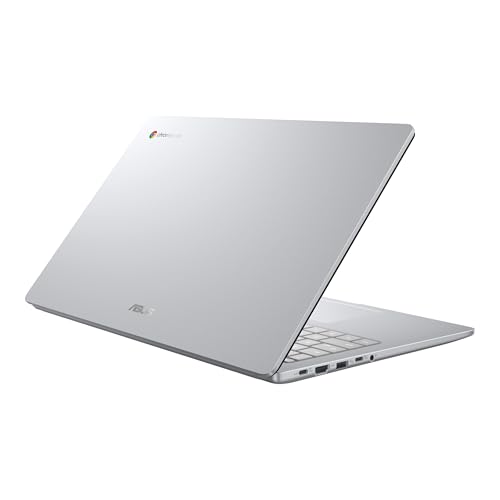
From the moment you power it on, the ASUS CX15 runs smooth and hassle-free. Thanks to fast boot times, it’s ready to go in seconds, which makes jumping into assignments or online classes feel seamless. Automatic updates run quietly in the background, so the system stays current without interrupting your workflow.
Performance is handled by the Intel N50 processor paired with 8GB of LPDDR5 memory and 128GB of storage. This setup works well for typical student needs like browsing, writing papers, and using cloud-based apps. We found it especially suited for multitasking across tabs without feeling overly restricted. The inclusion of three months of Google AI Pro, along with tools like NotebookLM, adds a helpful boost for productivity and research tasks.
Battery life stretches up to 10 hours, which comfortably supports a full school day or a long study session. The lightweight build, combined with military-grade durability, makes it easy to carry around campus without much concern.
The performance ceiling is something to keep in mind. The Intel N50 is built for basic tasks, so heavier workloads or demanding applications may push its limits. But for everyday student use, it delivers a reliable and efficient experience.

Comfortable keyboard with numeric keypad Eye-friendly display with ComfortView Ergonomic lifted hinge typing angle Efficient charging with Express Charge
Not suitable for gaming tasks
The Dell 15 DC15250 offers a practical setup right from the start, led by its Intel Core 3 processor for daily tasks. It handles common student workloads like writing papers, browsing, and organizing files without unnecessary complexity. We found that it leans into consistency rather than pushing performance boundaries, which suits routine use just fine.
Comfort is where this laptop quietly stands out. The inclusion of Dell ComfortView software helps reduce blue light exposure, making longer study sessions easier on the eyes. The keyboard layout also plays a role here, offering a roomy typing space along with a dedicated numeric keypad and calculator hotkey—small touches that can speed up work, especially for students dealing with numbers.
The lifted hinge design adds an ergonomic typing angle, helping keep wrists in a more natural position over time. Battery efficiency is supported by Express Charge, so you can quickly top up and get back to work without long interruptions. However, the integrated graphics aren’t designed for gaming or demanding creative tasks, which narrows its use for more intensive workloads. Overall, for everyday academic needs, it delivers a comfortable and dependable experience.

Copilot key for instant AI help All-day battery life Wi-Fi 6 and HDMI 2.1 included AcerSense monitors device health easily
Display brightness and color are fairly basic
There’s something quietly satisfying about a laptop that doesn’t try to be a hero, it just shows up, handles the list, and keeps going. That’s the Acer Aspire Go 15. This isn’t a flashy creator machine or a gaming rig; it’s a 15.6-inch workhorse built for everyday chaos: juggling browser tabs, answering emails, and streaming shows between charges. With Copilot baked in and a focus on battery life, its primary purpose is to keep you moving without constantly hunting for an outlet or waiting on slow storage.
Diving into the daily flow, the Intel Core i3-N305 processor paired with 8GB of LPDDR5 RAM handles multitasking with surprising composure. We especially appreciated the 128GB Universal Flash storage—it loads apps faster than we expected from this class, making the “responsive performance” claim feel real.
A notable pro is the Copilot key: one tap brings up Windows’ generative AI assistant, which speeds up drafting and research across apps. On the connectivity front, the full-function USB-C port (charging and data) plus Wi-Fi 6 keeps things modern. The only drawback is that the display’s brightness and color are fairly basic. But the narrow bezel and 1080p IPS panel keep text sharp for casual use.

Up to 13.5 hours battery life Weighs only 2.87 pounds Privacy shutter on HD camera Quiet MediaTek processor
No fingerprint reader for quick login
When you're a student balancing classes, coffee shop study sessions, and group projects, the last thing you need is a heavy laptop that dies before lunch. The Lenovo IdeaPad Slim 3 Chromebook gets that. Weighing just 2.87 pounds with a clean abyss blue finish, this 14 inch laptop is built for backpacks and long days. Its primary purpose is to keep you working and playing without hunting for an outlet, thanks to a battery that pushes past the typical school day.
This Chromebook makes a strong case as the best budget laptop for students who live out of a bag. Up to 13.5 hours of battery life means you can leave the charger at home for a full campus schedule. We really like the MediaTek Kompanio 520 processor; it keeps the chassis quiet while moving between Google Docs and YouTube playlists. One notable pro is the Waves MaxxAudio tuned stereo speakers, which elevate your music or lecture playback beyond basic laptop sound.
For privacy, the built in shutter on the HD camera and the dedicated mute key give peace of mind during video calls. Nonetheless, there is no fingerprint reader. You will rely on traditional password entry unless you use a PIN or smart unlock option. In general, the lightweight design and all day battery cover the essentials a student truly needs.

Strong multitasking with 16GB RAM Extra storage with external drive Anti-glare screen for flexible use Windows 11 Pro with security
Noticeable fan noise under load
For students juggling multiple tasks at once, having a laptop that keeps up can make a real difference. The HP 14” Laptop is built with that kind of workload in mind, offering a mix of performance and practical features for everyday school use. Its built-in 128GB UFS storage handles everyday files efficiently, while the included 500GB external drive gives extra room for larger projects, media, or backups. That added space can be a practical bonus for longer-term use.
Moreover, the 14-inch HD display keeps things simple but functional, with an anti-glare panel that makes it easier to work in brighter environments. It’s well-suited for online classes too, thanks to the built-in HD camera and dual microphones. Running on Windows 11 Pro, the system stays responsive with fast startup times and added security features.
One thing you may notice during heavier use is the fan noise. It’s not constant, but it can become more noticeable when the system is working harder. However, for students needing strong multitasking performance, it remains a capable option.

15 hour battery life Sharp 1080p FHD 14 inch display Includes 64GB eMMC plus memory card Privacy shutter covers the webcam
May have occasional screen flickering
For students hunting for the best budget laptop that can survive a full day of Zoom classes and Google Classroom, the ASUS Chromebook CM14 makes a quiet but compelling case. This 14 inch laptop packs a 1080p FHD display and a claimed 15 hour battery life into a straightforward, privacy focused design. The primary purpose here is remote learning readiness: online classes, video conferencing, and juggling browser tabs without constant charging stops. It does not try to be fancy, but it does try to be dependable.
Opening this ASUS Chromebook feels like grabbing a dedicated study partner. The 14" FHD display delivers impressive color and clarity for the price range, making lecture slides and video streams look sharp. Its 8 core MediaTek Kompanio 520 processor paired with 4GB of RAM handles multiple tabs and Google Classroom smoothly without frustrating lag.
Plus, the privacy shutter on the webcam slides over instantly, a simple touch that matters for back to back video calls. Battery life genuinely approaches 15 hours, so you can leave the charger behind. Unfortunately, it may have occasional screen flickering. It is not constant on every unit, but it is worth testing early during your return window. For the price, the responsive Chrome OS experience and all day battery still make this a strong value pick.
Which Criteria Do Our Experts Advice To Consider When Purchasing Of best budget laptop for students?
According to our experts, you should understand some sides of the product to get the finest one. Like others, best budget laptop for students of 2026 might include many factors for you to take into account. For that, each among best budget laptop for students will have unique features and challenges as well to consist of.
The focus on the following features of best budget laptop for students is highly recommended, given they have come together with tech-evaluated certification:
-buyingguide
FAQs
What is the best budget laptop for students?
The best budget laptop depends on your needs, but most students should look for reliable models with good battery life, at least 8GB RAM, and SSD storage.
Is 4GB RAM enough for student laptops?
4GB RAM can handle basic tasks, but 8GB RAM is recommended for smoother multitasking and long-term use.
Can a budget laptop handle online classes and assignments?
Yes, budget laptops are designed for tasks like video calls, browsing, word processing, and online learning platforms.
About Michael Brown