The Best Monitor For Gaming Laptop Of 2025
 By, Michael Brown
Updated
Summary

ASUS TUF 32" 1440P Monitor

SANSUI 27 Inch Curved Monitor

KTC 24 Inch 180Hz Monitor
If you own a powerful gaming laptop, pairing it with the right monitor can completely change your experience. A high-refresh-rate display brings smoother gameplay, sharper visuals make open worlds more immersive, and reliable connectivity ensures no lag between your laptop and the screen.
But with so many choices on the market ranging from ultra-portable monitors to large immersive panels, it’s not always clear which one best fits your needs. Gamers who value speed may prioritize refresh rates and response times, while those who enjoy cinematic visuals might lean toward 4K or HDR monitors. Others may need a balance between portability and performance, especially if they switch between work and gaming.
To make the decision easier, we’ve researched the most important features to look for and highlighted the top monitor options that pair seamlessly with gaming laptops. Read on below to find the best monitor that enhances your laptop gaming setup.
Our Top Picks


165Hz Refresh Rate 1500R Curvature Shadow Boost enhances dark areas Flicker-Free reduces eyestrain
No dedicated DisplayPort slot
The ASUS TUF 32" 1440P Monitor appears to be a great choice for both gamers and media enthusiasts. We love its 165Hz refresh rate and Extreme Low Motion Blur (ELMB) technology, which are designed to work together to eliminate lag and motion blur. This means you get a buttery-smooth experience, with objects in motion appearing sharper and more responsive—a huge advantage in fast-paced games.
The Shadow Boost Technology is another standout feature, enhancing dark areas of a game without overexposing the brighter parts. This could be a game-changer for spotting enemies lurking in the shadows. This monitor also seems to prioritize user comfort with Flicker-Free and Ultra-Low Blue Light technologies, which are designed to reduce eyestrain during long gaming or viewing sessions.
However, it doesn't come with a DisplayPort slot. This isn't a major drawback, as the available connections should still cover most users' needs. The ergonomic design with tilt and swivel adjustments also makes it easy to find a comfortable viewing position, and the VESA compatibility adds flexibility for different setups. Overall, this monitor is engineered to deliver a top-tier visual and gaming experience.

180Hz refresh rate 1ms response time 130% sRGB color gamut Built-in speakers for convenience
The screen curve is a bit small
The SANSUI 27-inch monitor seems to pack a lot of features into a single package, making it a versatile choice. The 180Hz refresh rate and 1ms response time are highlights, designed to reduce motion blur and provide a competitive edge in fast-paced games. The 130% sRGB color gamut and HDR support suggest that it's capable of producing rich, vibrant colors and deep blacks, which would make both games and movies look fantastic.
We also noted the convenience of having two built-in 2W speakers and an audio jack, which could be a handy feature for a clean desk setup without external speakers. This monitor also includes some nice gaming-centric features like CrossHair, Timer, and Shadow Booster technology, which are designed to enhance your in-game experience. One minor downside is that the screen curve is a bit small. Despite this, it offers a compelling set of features for its category.
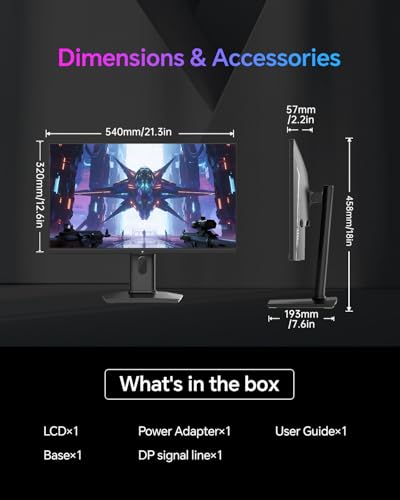
QHD resolution and a Fast IPS panel 180Hz for seamless gaming HDR400 for stunning visuals Ergonomic design for comfort
Only one HDMI port
The KTC 24-inch monitor is a strong performer, especially for its size. The combination of a QHD resolution and a Fast IPS panel on a 24-inch screen means you get an extremely sharp and detailed image, making every texture and line pop. The 180Hz refresh rate, with the option to overclock to 185Hz, is excellent for gamers, as it works with FreeSync and G-Sync compatibility to help eliminate screen tearing and motion blur.
From a visual standpoint, the monitor promises rich, lifelike colors with 99% sRGB color gamut coverage and HDR400 support, which would make any media look fantastic. We also appreciate the ergonomic design, including tilt, pivot, and height adjustments, allowing for a customized setup. The inclusion of low blue light, anti-glare, and flicker-free technologies is a thoughtful touch, making it more comfortable for extended use.
Nevertheless, it only has one HDMI port. This might require a little more planning if you need to connect multiple devices simultaneously, but the included DisplayPort 1.4 port still provides plenty of bandwidth for high-resolution, high-refresh-rate performance.
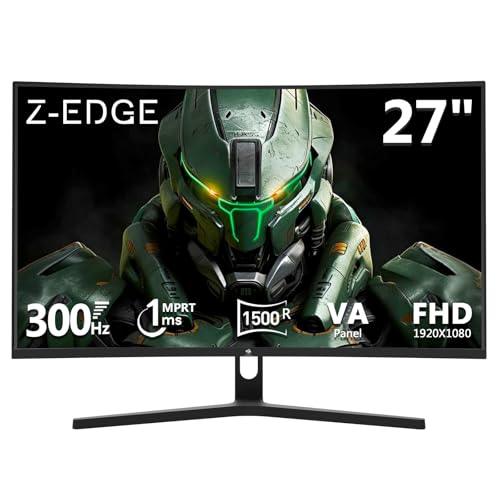
300Hz for e-sports level speed 1ms response time for accuracy Immersive curved screen design Powerful connectivity with two DP ports
Not very bright
The Z-Edge 27-inch monitor is a strong contender for serious gamers who prioritize speed. Its phenomenal 300Hz refresh rate and a 1ms response time promise an extremely fluid and responsive gaming experience. This level of performance is ideal for e-sports and competitive gaming, where every millisecond counts. We also noted the immersive curved screen, which not only draws you into the game but also helps to reduce eye strain during marathon sessions.
The 3000:1 contrast ratio is another great feature, as it's designed to produce deep blacks and vibrant highlights, adding a sense of depth and clarity to every scene. The connectivity choices were also very good. There were two DP connectors that both supported the full 300Hz frame rate, and there were two HDMI ports for consoles or other devices. While the monitor offers a vibrant and immersive experience, one thing to note is that it may not be very bright. This isn't a major issue, as many gamers prefer to play in dimly lit rooms, and the monitor's strengths in other areas make it an excellent choice for a dedicated gaming setup.

QHD resolution for sharp visuals 180Hz refresh rate for fluid performance Vibrant colors with DCI-P3 95% Hardware-based low blue light
No built-in speakers
Based on our research, the Alienware 27 AW2725DM Monitor is suitable for gamers seeking a high-quality visual experience without compromising performance. Its QHD resolution on a 27-inch screen is a fantastic combination, offering sharp and detailed images that make every texture stand out. The monitor's 180Hz refresh rate and 1ms gray-to-gray response time are key features, designed to provide smooth, tear-free gameplay that allows you to react instantly to the on-screen action.
Thanks to DCI-P3 95% color coverage and VESA DisplayHDR 400 certification, you can expect rich, lifelike colors and good contrast. This monitor also seems to be designed with user comfort in mind, offering a hardware-based low blue light solution to help reduce eye strain during long gaming sessions. One minor drawback is that it doesn't come with built-in speakers. This isn't a huge concern, as many gamers prefer using headphones or external speakers for better audio quality, but it's something to consider for those who want an all-in-one solution.

1.7x the pixel density of Full HD 1000R curvature for immersion 165Hz for smooth gameplay HDR10 for stunning colors
The base is pretty big
For those seeking a responsive and immersive gaming experience, the Samsung 32" Odyssey G55C is a good pick. The QHD resolution is a fantastic feature, providing 1.7x the pixel density of Full HD, which means you get incredibly detailed and clear visuals. The monitor's 1000R curvature is a key selling point, as it is designed to match the curvature of the human eye, creating a truly enveloping experience that fills your peripheral vision.
A 165 Hz refresh rate and a 1 ms reaction time combined to reduce input latency and blurry motion, which contributed to the fluid performance. The addition of AMD FreeSync is a big plus, as it helps to keep the visuals tear-free and fluid. This monitor also supports HDR10, which should bring a wider range of colors and greater detail to both dark and bright scenes.
Nonetheless, the base is quite large. This isn't a dealbreaker, as a sturdy base is important for stability, but it's something to keep in mind if you have a smaller desk or a crowded setup. Overall, the Odyssey G55C is built to provide an exhilarating gaming experience.

280Hz with AMD FreeSync 1800R curved VA panel 120% sRGB color accuracy Low blue light for eye comfort
No included HDMI cable
For people who want a high refresh rate for competitive play, the CRUA 27" 280Hz monitor looks like a wonderful choice. The 280Hz refresh rate, combined with AMD FreeSync, is designed to deliver incredibly fluid gameplay with minimal input lag and screen tearing. This is a game-changer for fast-paced genres like first-person shooters and racing games.
Its 1800R curved VA panel also works to draw you into the content and enhance visual comfort, especially during long sessions. This monitor also appears to offer good color quality, with 120% sRGB color accuracy, making it a versatile option for both gaming and media consumption. It's even nice that it includes a low blue light filter and flicker-free technology to make your eyes more comfortable. Nevertheless, it doesn't come with an HDMI cable. In general, this monitor is an excellent option for a smooth and immersive gaming experience.
Which Characteristics To Consider On Selecting best monitor for gaming laptop For 2025?
To make a practical purchase, you guys need to be aware of best monitor for gaming laptop ultimately. Several key factors must be taken into account and evaluated. Of course, there are some challenges for you during the process of studying products. So we are available here to provide you with comprehensive advice and support.
Thanks to the evaluation supported by high technology, we have come up with some significant features for you to go through. Let’s check it below!
Connections
Refresh Rate
Brightness
Resolution
Panel Type
Screen Size
Aspect Ratio
Response Time
FAQs
Do I need a 4K monitor for gaming on a laptop?
Not necessarily. A 1080p or 1440p monitor with a high refresh rate often provides smoother gameplay. 4K monitors are best if your laptop’s GPU can handle demanding games at higher settings.
Can I use an external monitor with a gaming laptop for better performance?
Yes. An external monitor won’t increase your laptop’s raw power, but it can give you a larger display, higher refresh rate, and better color accuracy for an enhanced experience.
How do I connect my gaming laptop to a monitor?
Most gaming laptops connect via HDMI or USB-C/Thunderbolt. To take advantage of high refresh rates, make sure you’re using the right cable (e.g., HDMI 2.1 or DisplayPort over USB-C).
About Michael Brown