The Best 25 Inch Gaming Monitor For 2025
 By, Michael Brown
Updated

Summary

ASUS TUF 25” Gaming Monitor

KOORUI 25 Inch Curved Gaming Monitor

Sceptre Gaming Monitor
Looking for the perfect balance between speed, clarity, and size? A 25-inch gaming monitor could be just what you need. This display size has become a sweet spot for many gamers, large enough to offer an immersive viewing experience but compact enough to fit comfortably on most desks. With high refresh rates, ultra-fast response times, and adaptive sync technology, today’s 25-inch monitors are built to deliver smooth, tear-free gameplay that keeps you competitive in fast-paced titles.
Beyond performance, many models also bring slim bezels, ergonomic stands, and eye-care features that make long sessions more comfortable. Whether you’re into esports, casual gaming, or even multitasking, these monitors provide sharp visuals and responsive controls without overwhelming your setup.
Ahead, we've compiled a list of the Best 25 Inch Gaming Monitor to help you select one that fits your play style, setup, and budget.
Our Top Picks


180Hz refresh rate, ultra-smooth play 1ms response time, blur-free motion Shadow Boost enhances dark areas Low Blue Light reduces eye strain
No USB hub included
ASUS brings its gaming expertise into focus with the TUF 25” Gaming Monitor, combining speed and clarity in one sleek package. Its ultra-fast 180Hz refresh rate, paired with a 1ms response time, makes action scenes feel crisp and eliminates much of the blur that can affect fast-paced gameplay. Titles like first-person shooters or racing sims especially benefit, giving players an edge with instantaneous reaction times.
The addition of AMD FreeSync and ASUS Extreme Low Motion Blur technology keeps frames consistent and smooth, reducing tearing and ghosting for an immersive experience. Shadow Boost is another intelligent feature that brightens darker areas in games without overexposing the rest, making it simpler to identify opponents hidden in the shadows. On top of that, ASUS Low Blue Light technology helps reduce eye strain, allowing longer play sessions with less fatigue.
Connectivity is flexible with dual HDMI 2.0 ports and DisplayPort 1.2, ensuring compatibility with multiple devices. The only missing piece is a USB hub, which could have added more convenience, but for most gamers, the performance focus makes this a minor trade-off.
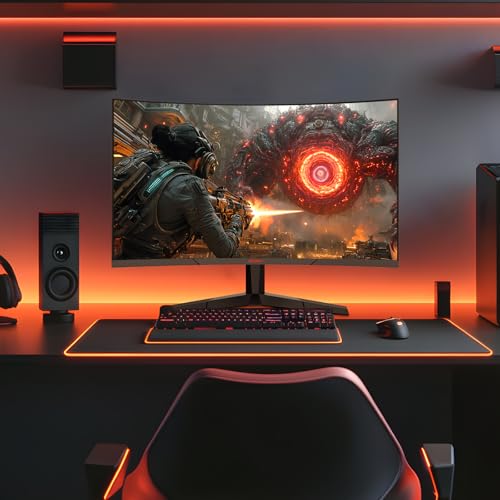
240Hz refresh rate for smooth play 1500R curve enhances immersion 90% DCI-P3 with HDR10 support Flicker-Free and Blue Light Filter
The screen can appear dim in bright rooms
KOORUI has crafted a monitor that leans heavily into immersion, and the 25-inch curved display does exactly that. With its 1500R curvature, the screen wraps gently around your field of view, drawing you into racing tracks, battlefields, and cinematic cutscenes alike.
Visuals are sharp when paired with Full HD resolution, and the experience becomes wonderfully fluid when you combine that with a lightning-fast 240Hz refresh rate and 1ms GTG response. This makes it ideal for competitive eSports or fast-paced shooters. By controlling frames, adaptive sync removes the majority of tearing and stuttering.
Color quality also gets a boost thanks to 90% DCI-P3 coverage and HDR10, which add richness and vibrancy across all types of content. A strong 3000:1 contrast ratio further enhances depth, letting darker tones stand out with greater definition. While the display can feel a little dim in very bright rooms, this doesn’t take away from its performance in typical gaming setups where lighting is controlled.

240Hz refresh rate for fluid motion 1ms blur reduction boosts response 100% sRGB for vibrant colors Blue-Light Shift reduces eye strain
The sound is not very good
The Sceptre Gaming Monitor is different from other monitors because it is very responsive. With a 240Hz frame rate and 1ms Blur Reduction, every move feels quick and smooth, getting rid of the hesitation that may mess up competitive play. The action stays smooth even in fast-paced shooters or racing games, which gives you an edge when you need to respond quickly.
Beyond gaming, the monitor is surprisingly versatile. Its 100% sRGB color gamut ensures rich, accurate hues, making it suitable not only for entertainment but also for creative projects where true-to-life color reproduction is important. Blue-Light Shift is another thoughtful inclusion, easing eye strain during long sessions so you can stay focused without fatigue.
Connectivity is generous with two HDMI ports and two DisplayPorts, all capable of supporting the full 240Hz performance. Built-in speakers and an audio-out jack add convenience, though the sound quality is more practical than premium. Still, for everyday use or when you want to keep your setup uncluttered, they do the job well.

220Hz refresh rate keeps gameplay smooth Gamer-Experienced Color technology Preset modes tailored for various genres Built-in speakers add immersive sound
Stand design takes up extra space
BenQ’s MOBIUZ line is known for blending performance with immersion, and the EX251 continues that tradition with a refined approach. Its 220Hz refresh rate with fast response keeps gameplay fluid and sharp, even when the action on-screen gets hectic. Motion blur is significantly reduced, making quick turns, rapid movements, and high-speed chases look and feel seamless.
But what really makes this model different is BenQ's "Gamer-Experienced Colour." This new technology goes beyond standard colour settings to provide colours that are richer and more interesting for gaming. With the Colour Shuttle settings, players can switch between modes that are best for different types of games, including RPGs or FPS matches.
The EX251 also embraces convenience with plug-and-play connectivity across DP, HDMI, and even a USB hub, keeping your setup streamlined. The only drawback is the oversized stand, which can take up more desk space than expected. Despite this, for gamers who want a monitor that looks and feels immersive on every level, the EX251 delivers in style.
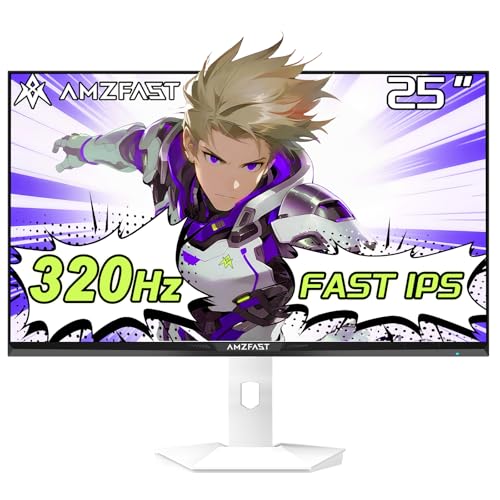
Blazing 320Hz refresh rate speed 0.5ms response for fluid motion 130% sRGB with HDR10 visuals E-sports optimized the 25-inch size
No built-in speakers
The Amzfast 25 Inch Gaming Monitor is built for those who crave pure speed. The 320Hz refresh rate is the most important feature. It's one of the quickest on the market, thus every frame is crystal clear. Even if you don’t need the full 320Hz, it’s versatile enough to support 300Hz or 240Hz modes, ensuring compatibility across setups and personal preferences. Paired with a 0.5ms MPRT response, the display minimizes motion blur, making high-speed movements feel effortless and natural.
The 25-inch form size is purposeful, since it aligns with professional e-sports requirements for the best viewing distance. The FAST IPS panel offers 130% sRGB coverage and HDR10 compatibility, making colours pop without sacrificing accuracy. Its unique gaming capabilities, including FPS/RTS/RPG modes, AI crosshair support, Night Vision, and screen-size customisation, make it a flexible tool for any genre.
On the practical side, TÜV Rheinland-certified low blue light and anti-flicker tech mean long sessions are easier on the eyes. Connectivity is strong with dual HDMI 2.0 and DP 1.4 ports, plus VESA mounting support. Although it doesn't come with built-in speakers, this won't be a deal-breaker for competitive players who already rely on dedicated headsets.

250Hz refresh rate with smooth flow 0.5ms GtG minimizes ghosting Rapid VA delivers vivid contrast Console Mode supports 120Hz FHD
The stand supports tilt adjustment only
MSI’s MAG 255XFV makes a strong impression as a gaming monitor designed for performance-driven players. The 250Hz overclocked refresh rate is what makes the experience so great. It makes sure that every frame flows smoothly, even in fast-paced games. With a super-fast 0.5ms GtG response time, ghosting and tearing are kept at bay, so you can focus on your reaction instead of screen lag.
The Rapid VA panel makes things even more interesting by adding high contrast and rich colours that make both bright and dark situations look deeper. It's not just for PC gamers, either. Its Console Mode lets it support 120Hz FHD resolution, so it's a good pick for next-gen console users who want sharper graphics in games like shooters and sports games. The frameless design also works in its favor, keeping the focus entirely on the action and minimizing distractions.
However, the stand supports tilt adjustment only, without options for height, swivel, or pivot. Overall, for gamers who value responsiveness, crisp visuals, and multi-platform compatibility, the MSI MAG 255XFV delivers where it matters most.

280Hz refresh rate with 0.5ms response FreeSync Premium & G-Sync support USB-C with 65W charging power Ergonomic stand for full adjustment
Takes a bit longer to wake up
ViewSonic delivers a monitor that bridges performance with practicality in the XG2536. The 25-inch IPS panel keeps visuals sharp and vibrant, while the ultra-fast 280Hz refresh rate paired with a 0.5ms MPRT response ensures every frame feels crisp and responsive. Whether you’re in the middle of a fast-paced FPS match or chasing victory in a racing sim, motion stays fluid and blur-free. FreeSync Premium and NVIDIA G-Sync compatibility add an extra layer of smoothness, eliminating tearing and stuttering for consistently immersive play.
Furthermore, the USB-C port not only handles video and data transfer but also delivers 65W charging. The ergonomic stand adds versatility, offering height, tilt, and swivel adjustments so you can game comfortably for hours. Connectivity is broad too, with HDMI, DisplayPort, and USB-C supporting PCs, Macs, and consoles like PS5, Xbox, and even handhelds like the Switch or Steam Deck.
The only drawback is that the monitor can take a moment to wake up from sleep, but once it’s running, performance remains seamless. For gamers who want cutting-edge speed with modern convenience, the XG2536 hits a sweet spot.
What to Look For in a best 25 inch gaming monitor?
Actually, when you decide to invest in best 25 inch gaming monitor for yourself, lots of things to consider! It's harder to choose since the product comes with many types, functions, and features from different manufacturers. That’s why you should find a reliable space to acquire knowledge related to the item.
We’ve highlighted the essential features of the best 25 inch gaming monitor below. Along with checking out the list of best models in the list, you should also carefully read the buying guide here:
Screen Size
Response Time
Brightness
Refresh Rate
Panel Type
Resolution
Connections
Aspect Ratio
FAQs
Is a 25-inch gaming monitor good for competitive gaming?
Yes. A 25-inch monitor offers a compact size that keeps all the action in view, making it ideal for fast-paced competitive games.
What refresh rate should I look for in a 25-inch gaming monitor?
A refresh rate of at least 144Hz is recommended, but 240Hz or higher provides the smoothest performance for esports.
Are 25-inch monitors better than 27-inch for gaming?
It depends on preference. A 25-inch is more compact and great for focused, fast gaming, while 27-inch offers more screen space and immersion.
After knowing the suitable kinds of best 25 inch gaming monitor and the features you wish, it’s high time for you to start your shopping. Note that you shouldn’t run out to a particular store or start scrolling through online sales just yet. With the development of technology, especially the expansion of sale sites, you can easily find your buddy.
Remember to check out our site weekly round-up to ensure that the current sales on best 25 inch gaming monitor perform well in our tests. So you can catch up with them as soon as possible. Would you please give us your feedback for better service? Many thanks!
About Michael Brown